Installing Grid Infrastructure 11.2.0.3 on Oracle Linux 6.1
Yesterday was the big day, or the day Oracle release 11.2.0.3 for Linux x86 and x86-64. Time to download and experiment! The following assumes you have already configured RAC 11g Release 2 before, it’s not a step by step guide how to do this. I expect those to shoot out of the grass like mushrooms in the next few days, especially since the weekend allows people to do the same I did!
The Operating System
I have prepared a xen domU for 11.2.0.3, using the latest Oracle Linux 6.1 build I could find. In summary, I am using the following settings:
- Oracle Linux 6.1 64-bit
- Oracle Linux Server-uek (2.6.32-100.34.1.el6uek.x86_64)
- Initially installed to use the “database server” package group
- 3 NICs – 2 for the HAIP resource and the private interconnect with IP addresses in the ranges of 192.168.100.0/24 and 192.168.101.0/24. The public NIC is on 192.168.99.0/24
- Node 1 uses 192.168.(99|100|101).129 for eth0, eth1 and eth2. The VIP uses 192.168.99.130
- Node 1 uses 192.168.(99|100|101).131 for eth0, eth1 and eth2. The VIP uses 192.168.99.132
- The SCAN is on 192.168.99.(133|134|135)
- All naming resolution is done via my dom0 bind9 server
- I am using a 8GB virtual disk for the operating system, and a 20G LUN for the oracle Grid and RDBMS homes. The 20G are subdivided into 2 LVMs of 10G each mounted to /u01/app/oracle and /u01/crs/11.2.0.3. Note you now seem to need 7.5 G for GRID_HOME
- All software is owned by Oracle
- Shared storage is provided by the xen blktap driver
- 3 x 1G LUNs for +OCR containing OCR and voting disks
- 1 x 10G for +DATA
- 1 x 10G for +RECO
Configuring Oracle Linux 6.1
Installation of the operating environment is beyond the scope of this article, and it hasn’t really changed much since 5.x. All I did was to install the database server package group. I wrote this article for fans of xen-based para-virtualisation. Although initially for 6.0, it applies equally for 6.1. Here’s the xen native domU description (you can easily convert that to xenstore format using libvirt):
# cat node1.cfg
name="rac11_2_0_3_ol61_node1"
memory=4096
maxmem=8192
vcpus=4
on_poweroff="destroy"
on_reboot="restart"
on_crash="destroy"
localtime=0
builder="linux"
bootargs=""
extra=" "
disk=[
'file:/var/lib/xen/images/rac11_2_0_3_ol61_node1/disk0,xvda,w',
'file:/var/lib/xen/images/rac11_2_0_3_ol61_node1/oracle,xvdb,w',
'file:/var/lib/xen/images/rac11_2_0_3_ol61_shared/ocr1,xvdc,w!',
'file:/var/lib/xen/images/rac11_2_0_3_ol61_shared/ocr2,xvdd,w!',
'file:/var/lib/xen/images/rac11_2_0_3_ol61_shared/ocr3,xvde,w!',
'file:/var/lib/xen/images/rac11_2_0_3_ol61_shared/data1,xvdf,w!',
'file:/var/lib/xen/images/rac11_2_0_3_ol61_shared/fra1,xvdg,w!'
]
vif=[
'mac=00:16:1e:2b:1d:ef,bridge=br1',
'mac=00:16:1e:2b:1a:e1,bridge=br2',
'mac=00:16:1e:2a:1d:1f,bridge=br3',
]
bootloader = "pygrub"
Use the “xm create node1.cfg” command to start the domU. After the OS was ready I installed the following additional software to satisfy the installation requirements:
- compat-libcap1
- compat-libstdc++-33
- libstdc++-devel
- gcc-c++
- ksh
- libaio-devel
This is easiest done via yum and the public YUM server Oracle provides. It also has instructions on how to set your repository up.
# yum install compat-libcap1 compat-libstdc++-33 libstdc++-devel gcc-c++ ksh libaio-devel
On the first node only I wanted a VNC-like interface for a graphical installation. The older package vnc-server I loved from 5.x isn’t available anymore, the package you need is now called tigervnc-server. It also requires a new viewer to be downloaded from sourceforge. On the first node you might want to install these, unless you are brave enough to use a silent installation:
- xorg-x11-utils
- xorg-x11-server-utils
- twm
- tigervnc-server
- xterm
Ensure that SELinux and the IPTables packages are turned off. SELinux is still configured in /etc/sysconfig/selinux, where the setting has to be permissive at least. You can use “chkconfig iptables off” to disable the firewall service at boot. Check that there are no filter rules using “iptables -L”.
I created the oracle account using these usual steps-this hasn’t change since 11.2.0.2.
A few changes to /etc/sysctl.were needed; you can copy and paste the below example and append it to your existing settings. Ensure to up the limits where you have more resources!
kernel.shmall = 4294967296
kernel.shmmni = 4096
kernel.sem = 250 32000 100 128
fs.file-max = 6815744
net.core.rmem_default = 262144
net.core.wmem_default = 262144
net.core.rmem_max = 4194304
net.core.wmem_max = 1048576
fs.aio-max-nr = 1048576
net.ipv4.ip_local_port_range = 9000 65500
net.ipv4.conf.eth1.rp_filter = 0
net.ipv4.conf.eth2.rp_filter = 0
Also ensure that you change the rp_filter for your private interconnect to 0 (or 2)-my devices are eth1 and eth2. This is a new requirement for reverse path filtering introduced with 11.2.0.3.
ASM “disks” must be owned by the GRID owner. The easiest way to change the permissions of the ASM disks is to create a new set of udev rules, such as the following:
# cat 61-asm.rules
 KERNEL=="xvd[cdefg]1", OWNER="oracle", GROUP="asmdba" MODE="0660"
After a quick “start_udev” as root these were applied.
In the first incarnation of this post I forgot to add the shell and process limits! Proceed by adding these:
oracle               soft    nproc   2047
oracle               hard    nproc   16384
oracle               soft    nofile  1024
oracle               hard    nofile  65536
oracle               soft    memlock 5000000000
oracle               hard    memlock 5000000000
For these to take effect, add the below line to /etc/pam.d/login
session required pam_limits.so
Note that as per my domU config file I actually know the device names are persistent, so it was easy to come up with this solution. In real life you would use the dm-multipath package which allows setting the owner,group and permission now in /etc/multipath.conf for every ASM LUN.
There was an interesting problem initially in that kfod seemed to trigger a change of permissions back to root:disk whenever it ran. Changing the ownership back to oracle only lasted until the next execution of kfod. The only fix I could come up with involved the udev rules.
Good news for those who suffered from the multicast problem introduced in 11.2.0.2-cluvfy now knows about it and checks during the post hwos stage (I had already installed cvuqdisk):
[oracle@rac11203node1 grid]$ ./runcluvfy.sh stage -post hwos -n rac11203node1

Performing post-checks for hardware and operating system setup

Checking node reachability...
Node reachability check passed from node "rac11203node1"

Checking user equivalence...
User equivalence check passed for user "oracle"

Checking node connectivity...

Checking hosts config file...

Verification of the hosts config file successful

Node connectivity passed for subnet "192.168.99.0" with node(s) rac11203node1
TCP connectivity check passed for subnet "192.168.99.0"

Node connectivity passed for subnet "192.168.100.0" with node(s) rac11203node1
TCP connectivity check passed for subnet "192.168.100.0"

Node connectivity passed for subnet "192.168.101.0" with node(s) rac11203node1
TCP connectivity check passed for subnet "192.168.101.0"

Interfaces found on subnet "192.168.99.0" that are likely candidates for VIP are:
rac11203node1 eth0:192.168.99.129

Interfaces found on subnet "192.168.100.0" that are likely candidates for a private interconnect are:
rac11203node1 eth1:192.168.100.129

Interfaces found on subnet "192.168.101.0" that are likely candidates for a private interconnect are:
rac11203node1 eth2:192.168.101.129

Node connectivity check passed

Checking multicast communication...

Checking subnet "192.168.99.0" for multicast communication with multicast group "230.0.1.0"...
Check of subnet "192.168.99.0" for multicast communication with multicast group "230.0.1.0" passed.

Checking subnet "192.168.100.0" for multicast communication with multicast group "230.0.1.0"...
Check of subnet "192.168.100.0" for multicast communication with multicast group "230.0.1.0" passed.

Checking subnet "192.168.101.0" for multicast communication with multicast group "230.0.1.0"...
Check of subnet "192.168.101.0" for multicast communication with multicast group "230.0.1.0" passed.

Check of multicast communication passed.
Check for multiple users with UID value 0 passed
Time zone consistency check passed

Checking shared storage accessibility...

Disk                                  Sharing Nodes (1 in count)
------------------------------------  ------------------------
/dev/xvda                             rac11203node1
/dev/xvdb                             rac11203node1
/dev/xvdc                             rac11203node1
/dev/xvdd                             rac11203node1
/dev/xvde                             rac11203node1
/dev/xvdf                             rac11203node1
/dev/xvdg                             rac11203node1

Shared storage check was successful on nodes "rac11203node1"

Post-check for hardware and operating system setup was successful.
As always, I tried to fix as many problems before invoking runInstaller as possible. The “-fixup” option to runcluvfy is again very useful. I strongly recommend running the fixup script prior to executing the OUI binary.
The old trick to remove /etc/ntp.conf causes the NTP check to complete ok, in which case you are getting the ctsd service for time synchronisation. You should not do this in production-consistent times in the cluster are paramount!
I encountered an issue with the check for free space later in the installation during my first attemps. OUI wants 7.5G for GRID_HOME, even though the installation “only” took around 3 in the end. I exported TMP and TEMP to point to my 10G mount point to avoid this warning:
$ export TEMP=/u01/crs/temp
$ export TMP=/u01/crs/temp
$ ./runInstaller
The installation procedure for Grid Infrastructure 11.2.0.3 is almost exactly the same as for 11.2.0.2, except for the option to change the AU size for the initial disk group you create:
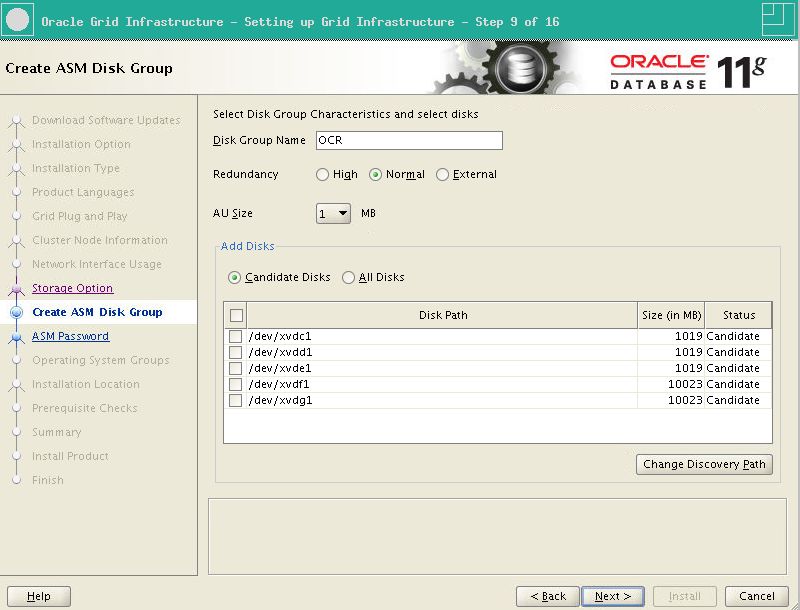
Once you have completed the wizard, it’s time to hit the “install” button. The magic again happens in the root.sh file, or rootupgrade.sh if you are upgrading. I included the root.sh output so you have something to compare against:
Performing root user operation for Oracle 11g

The following environment variables are set as:
ORACLE_OWNER= oracle
ORACLE_HOME=  /u01/crs/11.2.0.3

Enter the full pathname of the local bin directory: [/usr/local/bin]: Creating y directory...
Copying dbhome to y ...
Copying oraenv to y ...
Copying coraenv to y ...

Creating /etc/oratab file...
Entries will be added to the /etc/oratab file as needed by
Database Configuration Assistant when a database is created
Finished running generic part of root script.
Now product-specific root actions will be performed.
Using configuration parameter file: /u01/crs/11.2.0.3/crs/install/crsconfig_params
Creating trace directory
User ignored Prerequisites during installation
OLR initialization - successful
root wallet
root wallet cert
root cert export
peer wallet
profile reader wallet
pa wallet
peer wallet keys
pa wallet keys
peer cert request
pa cert request
peer cert
pa cert
peer root cert TP
profile reader root cert TP
pa root cert TP
peer pa cert TP
pa peer cert TP
profile reader pa cert TP
profile reader peer cert TP
peer user cert
pa user cert
Adding Clusterware entries to upstart
CRS-2672: Attempting to start 'ora.mdnsd' on 'rac11203node1'
CRS-2676: Start of 'ora.mdnsd' on 'rac11203node1' succeeded
CRS-2672: Attempting to start 'ora.gpnpd' on 'rac11203node1'
CRS-2676: Start of 'ora.gpnpd' on 'rac11203node1' succeeded
CRS-2672: Attempting to start 'ora.cssdmonitor' on 'rac11203node1'
CRS-2672: Attempting to start 'ora.gipcd' on 'rac11203node1'
CRS-2676: Start of 'ora.gipcd' on 'rac11203node1' succeeded
CRS-2676: Start of 'ora.cssdmonitor' on 'rac11203node1' succeeded
CRS-2672: Attempting to start 'ora.cssd' on 'rac11203node1'
CRS-2672: Attempting to start 'ora.diskmon' on 'rac11203node1'
CRS-2676: Start of 'ora.diskmon' on 'rac11203node1' succeeded
CRS-2676: Start of 'ora.cssd' on 'rac11203node1' succeeded

ASM created and started successfully.

Disk Group OCR created successfully.

clscfg: -install mode specified
Successfully accumulated necessary OCR keys.
Creating OCR keys for user 'root', privgrp 'root'..
Operation successful.
CRS-4256: Updating the profile
Successful addition of voting disk 1621f2201ab94f32bf613b17f62982b0.
Successful addition of voting disk 337a3f0b8a2d4f7ebff85594e4a8d3cd.
Successful addition of voting disk 3ae328cce2b94f3bbfe37b0948362993.
Successfully replaced voting disk group with +OCR.
CRS-4256: Updating the profile
CRS-4266: Voting file(s) successfully replaced
##  STATE    File Universal Id                File Name Disk group
--  -----    -----------------                --------- ---------
1. ONLINE   1621f2201ab94f32bf613b17f62982b0 (/dev/xvdc1) [OCR]
2. ONLINE   337a3f0b8a2d4f7ebff85594e4a8d3cd (/dev/xvdd1) [OCR]
3. ONLINE   3ae328cce2b94f3bbfe37b0948362993 (/dev/xvde1) [OCR]
Located 3 voting disk(s).
CRS-2672: Attempting to start 'ora.asm' on 'rac11203node1'
CRS-2676: Start of 'ora.asm' on 'rac11203node1' succeeded
CRS-2672: Attempting to start 'ora.OCR.dg' on 'rac11203node1'
CRS-2676: Start of 'ora.OCR.dg' on 'rac11203node1' succeeded
CRS-2672: Attempting to start 'ora.registry.acfs' on 'rac11203node1'
CRS-2676: Start of 'ora.registry.acfs' on 'rac11203node1' succeeded
Configure Oracle Grid Infrastructure for a Cluster ... succeeded
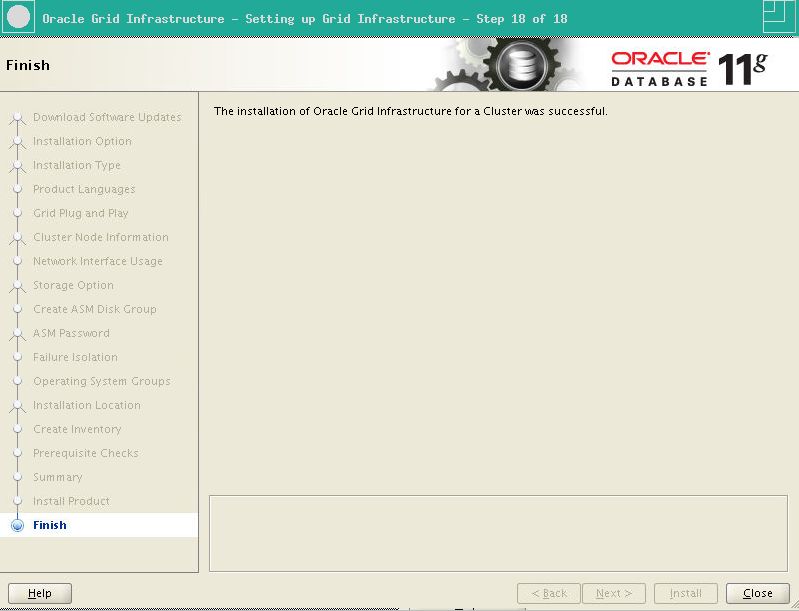
That’s it! After returning to the OUI screen you run the remaing assistants and finally are rewarded with the success message:
Better still, I could now log in to SQL*Plus and was rewarded with the new version:
$ sqlplus / as sysasm

SQL*Plus: Release 11.2.0.3.0 Production on Sat Sep 24 22:29:45 2011

Copyright (c) 1982, 2011, Oracle.  All rights reserved.

Connected to:
Oracle Database 11g Enterprise Edition Release 11.2.0.3.0 - 64bit Production
With the Real Application Clusters and Automatic Storage Management options

SQL> select * from v$version;

BANNER
--------------------------------------------------------------------------------
Oracle Database 11g Enterprise Edition Release 11.2.0.3.0 - 64bit Production
PL/SQL Release 11.2.0.3.0 - Production
CORE    11.2.0.3.0      Production
TNS for Linux: Version 11.2.0.3.0 - Production
NLSRTL Version 11.2.0.3.0 - Production

SQL>
Summary
You might remark that in the output there has only ever been one node referenced. That is correct-my lab box has limited resources and I’d like to test the addNode.sh script for each new release so please be patient! I’m planning an article about upgrading to 11.2.0.3 soon, as well as the addition of a node. One thing I noticed was the abnormally high CPU usage for the CSSD processes: ocssd.bin, cssdagent and cssdmonitor-something I find alarming at the moment.
top - 22:53:19 up  1:57,  5 users,  load average: 5.41, 4.03, 3.77
Tasks: 192 total,   1 running, 191 sleeping,   0 stopped,   0 zombie
Cpu(s):  0.3%us,  0.2%sy,  0.0%ni, 99.5%id,  0.0%wa,  0.0%hi,  0.0%si,  0.0%st
Mem:   4102536k total,  3500784k used,   601752k free,    59792k buffers
Swap:  1048568k total,     4336k used,  1044232k free,  2273908k cached

PID USER      PR  NI  VIRT  RES  SHR S %CPU %MEM    TIME+  COMMAND
27646 oracle    RT   0 1607m 119m  53m S 152.0  3.0  48:57.35 /u01/crs/11.2.0.3/bin/ocssd.bin
27634 root      RT   0  954m  93m  55m S 146.0  2.3  31:45.50 /u01/crs/11.2.0.3/bin/cssdagent
27613 root      RT   0  888m  91m  55m S 96.6  2.3  5124095h /u01/crs/11.2.0.3/bin/cssdmonitor
28110 oracle    -2   0  485m  14m  12m S  1.3  0.4   0:34.65 asm_vktm_+ASM1
28126 oracle    -2   0  499m  28m  15m S  0.3  0.7   0:04.52 asm_lms0_+ASM1
28411 root      RT   0  500m 144m  59m S  0.3  3.6  5124095h /u01/crs/11.2.0.3/bin/ologgerd -M -d /u01/crs/11.2.0.3/crf/db/rac11203node1
32394 oracle    20   0 15020 1300  932 R  0.3  0.0  5124095h top
1 root      20   0 19336 1476 1212 S  0.0  0.0   0:00.41 /sbin/init

...
11.2.0.2 certainly didn’t use that much CPU across 4 cores…
Update: I have just repeated the same installation on VirtualBox 4.1.2 with less potent hardware, and funny enough the CPU problem has disappeared. How is that possible? I need to understand more, and maybe update the XEN host to something more recent.
 Martins Blog
Responses
[…] – Installation 11.2.0.3.0 on Oracle Linux 6.1 with UEK Kernel […]
When I tried to upgrade my 11.2.0.2 home to the new 11.2.0.3 Grid layer, it objected that it required a pre patch 12539000 applied to the GRID and all 11g database homes.
Hi Hamid,
I’m going to upgrade from 11.2.0.2.3 to 11.2.0.3.0 tomorrow, let’s see if I find that too.
Martin
Hi Martin and Hamid
Only an opinion:
but after seeing the result of recent upgrades for version 11.2. is much more reliable GI reinstall the software from scratch on each node …
Regards
Xavier