Some time ago I wrote a post about using OSWatcher for system analysis. Neil Chandler (@ChandlerDBA) rightfully pointed out that although OSWatcher on its own was all right, Tracefile Analyzer(TFA) was the way to go. TFA can include OSWatcher, but more importantly it adds a lot of value over and above what OSWatcher does. Up until version 22.2.0, that is:
Update 250203: starting with AHF/TFA 22.2.0 OSWatcher Analyzer is deprecated
Since I hit the “publish” button for the first time in 2016, a great many things happened. First and foremost, TFA become a part of Autonomous Health Framework (AHF). This was great for reasons you can find later in this article if you’re interested, although the main reason for posting this – OSWatcher analysis via tfactl – is no longer possible.
As per My Oracle Support Note 2926043.1, AHF and TFA no longer support OSWatcher Analysis via tfactl. In earlier releases you’d run tfactl oswbb -since 2h to get a good overview of what’s been going on for the last 2 hours. Beginning with AHF 22.2, this is no longer possible. Although OSWatcher collector (oswbb) is still present in AHF, you cannot analyse OSWatcher data. If you want to do that you need to get the Analyser (oswbba) from My Oracle Support Note 301137.1.
Should I use OSWatcher standalone or as part of AHF/TFA?
Based on the information in My Oracle Support Note 2926043.1 you don’t have a choice starting with AHF 22.2 and later. If you want to use OSWatcher Analyzer (oswbba), you need a full, stand-alone installation (see MOS Note 301137.1). Before you head over to MOS, please allow me to draw your attention to another very useful AHF feature that might better suit your needs: AHF Insights. Here is a picture of what it gives you:
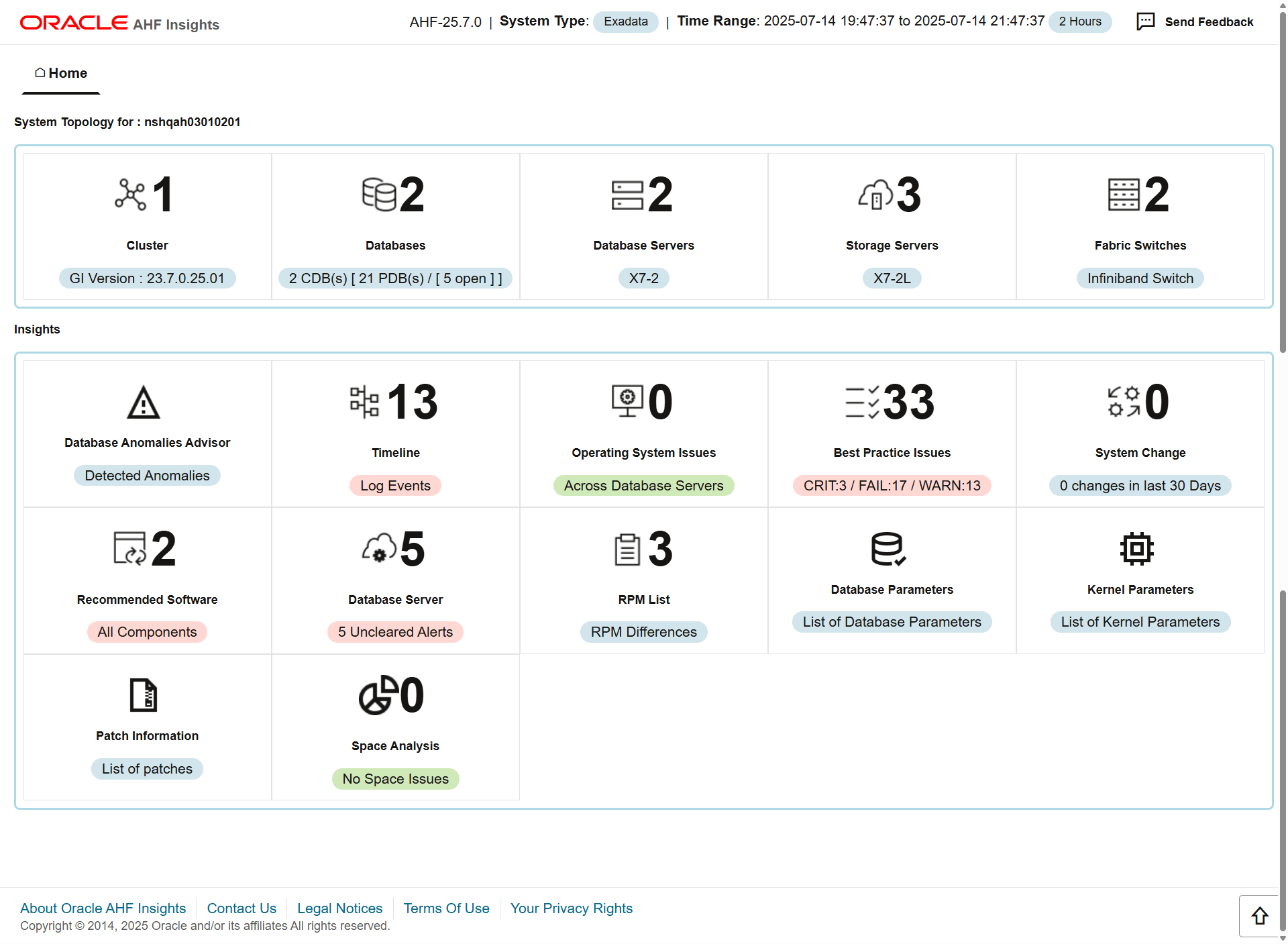
Performance metrics do look a lot better than what OSWatcher Dashboard provided:

I’ll write a post about AHF Insights very soon, because this is going to be pretty cool! In the meantime, please have a look at the documentation.
OSWatcher analysis – obsolete since AHF/TFA 22.2
The information in the following sections is obsolete for reasons discussed in the introduction. It is left here for nostalgic reasons, you should definitely NOT be using an incredibly outdated AHF/TFA release!
TFA (now part of AHF) is a tool which – among other things – helps you gather information about incidents. For clustered environment, it can do so across all the nodes. If you ever worked on Exadata half-racks or other clusters with more than 4 nodes you will quickly start to appreciate having to use one tool for this task. The TFA output is suitable for attaching to a Service Request which should, at least in theory, help speed up the problem resolution.
As an added benefit you get a lot of tools that were previously known as “RAC and DB Support Tools Bundle”. This includes OSWatcher as well, the reason for this post.
Running OSWatcher as part of TFA has one key benefit: you don’t have to worry about starting OSWatcher when booting. TFA is started via a systemd unit file in Oracle Linux 7. You can check its status using the standard systemd commands suite, as shown here:
[root@server5 ahf]# systemctl status oracle-tfa
● oracle-tfa.service - Oracle Trace File Analyzer
   Loaded: loaded (/etc/systemd/system/oracle-tfa.service; enabled; vendor preset: disabled)
   Active: active (running) since Thu 2020-04-23 14:34:13 BST; 1min 17s ago
 Main PID: 11095 (init.tfa)
   CGroup: /system.slice/oracle-tfa.service
           ├─11095 /bin/sh /etc/init.d/init.tfa run >/dev/null 2>&1
Support Tools Bundle
Earlier I said you benefit from the latest Support Tools Bundle when installing AHF. At the time of writing, this included the following tools:
[root@server5 ahf]# /opt/oracle.ahf/bin/tfactl status

.------------------------------------------------------------------------------------------------.
| Host    | Status of TFA | PID   | Port  | Version    | Build ID             | Inventory Status |
+---------+---------------+-------+-------+------------+----------------------+------------------+
| server5 | RUNNING       | 16762 | 25805 | 20.1.2.0.0 | 20120020200403113404 | COMPLETE         |
'---------+---------------+-------+-------+------------+----------------------+------------------'

[root@server5 ahf]# /opt/oracle.ahf/bin/tfactl toolstatus

.------------------------------------------------------------------.
|                   TOOLS STATUS - HOST : server5                  |
+----------------------+--------------+--------------+-------------+
| Tool Type            | Tool         | Version      | Status      |
+----------------------+--------------+--------------+-------------+
| Development Tools    | orachk       |   19.3.0.0.0 | DEPLOYED    |
|                      | oratop       |       14.1.2 | DEPLOYED    |
+----------------------+--------------+--------------+-------------+
| Support Tools Bundle | darda        | 2.10.0.R6036 | DEPLOYED    |
|                      | oswbb        |        8.3.2 | RUNNING     |
|                      | prw          | 12.1.13.11.4 | NOT RUNNING |
+----------------------+--------------+--------------+-------------+
| TFA Utilities        | alertsummary |   19.3.0.0.0 | DEPLOYED    |
|                      | calog        |   19.3.0.0.0 | DEPLOYED    |
|                      | dbcheck      |   18.3.0.0.0 | DEPLOYED    |
|                      | dbglevel     |   19.3.0.0.0 | DEPLOYED    |
|                      | grep         |   19.3.0.0.0 | DEPLOYED    |
|                      | history      |   19.3.0.0.0 | DEPLOYED    |
|                      | ls           |   19.3.0.0.0 | DEPLOYED    |
|                      | managelogs   |   19.3.0.0.0 | DEPLOYED    |
|                      | menu         |   19.3.0.0.0 | DEPLOYED    |
|                      | param        |   19.3.0.0.0 | DEPLOYED    |
|                      | ps           |   19.3.0.0.0 | DEPLOYED    |
|                      | pstack       |   19.3.0.0.0 | DEPLOYED    |
|                      | summary      |   19.3.0.0.0 | DEPLOYED    |
|                      | tail         |   19.3.0.0.0 | DEPLOYED    |
|                      | triage       |   19.3.0.0.0 | DEPLOYED    |
|                      | vi           |   19.3.0.0.0 | DEPLOYED    |
'----------------------+--------------+--------------+-------------'

Note :-
  DEPLOYED    : Installed and Available - To be configured or run interactively.
  NOT RUNNING : Configured and Available - Currently turned off interactively.
  RUNNING     : Configured and Available.

[root@server5 ahf]#
Invoking OSwatcher
At the risk of repeating myself, this will no longer work. If you try to invoke tfactl oswbb you get the following error:
# tfactl oswbb -since 2h
The analyze command is not supported within this version of OSWatcher. To run this command download the full version of OSWatcher from MOS Doc ID: 301137.1

    Where doc_ID is the MOS doc where customer can download the full OSWatcher from
Before AHF 22.2, you could get the data, as shown. You may want to consider AHF insights instead, as it provides a much more modern interface.
[oracle@server5 ~]$ tfactl oswbb -h

Usage : /opt/oracle.ahf/tfa/bin/tfactl.pl [run] oswbb [ | -since n[mhd] ]

Options:

-since n[mhd] Run OSWatcher analyzer for last n [m]inutes or [h]ours or [d]ays.

: -P  -L  -6 -7 -8 -B  -E  -A
     -P   User specified name of the html profile generated
                        by oswbba. This overrides the oswbba automatic naming
                        convention for html profiles. All profiles
                        whether user specified named or auto generated
                        named will be located in the /profile directory.

     -A  Same as option A from the menu. Will generate
                        an analysis report in the /analysis directory or
                        user can also specify the name of the analysis file
                        by specifying full qualified path name of file.
                        The "A" option can not be used together with the
                        "S" option.
     -S <>              Will generate an analysis of a subset of the data
                        in the archive directory. This option must be used
                        together with the -b and -e options below. See the
                        section "Specifying the begin/end time of the analysis"
                        above. The "S" option can not be used together with
                        the "A" option.

     -START   Used with the analysis option to specify the first
                        file located in the oswvmstat directory to analyze.

     -STOP    Used with the analysis option to specify the last
                        file located in the oswvmstat directory to analyze.

     -b     Used with the -S option to specify the begin time
                        of the analysis period. Example format:
                        -b Jan 09 13:00:00 2013

     -e       Used with the -S option to specify the end time
                        of the analysis period. Example format:
                        -e Jan 09 13:15:00 2013

     -L  User specified location of an existing directory
                        to place any gif files generated
                        by oswbba. This overrides the oswbba automatic
                        convention for placing all gif files in the
                        /gif directory. This directory must pre-exist!
     -6                 Same as option 6 from the menu. Will generate
                        all cpu gif files.


     -7                 Same as option 7 from the menu. Will generate
                        all memory gif files.

     -8                 Same as option 8 from the menu. Will generate
                        all disk gif files.


     -NO_IOSTAT         Ignores files in the oswiostat directory from
                        analysis

     -NO_TOP            Ignores files in the oswtop directory from
                        analysis

     -NO_NETSTAT        Ignores files in the oswnetstat directory from
                        analysis

     -NO_PS             Ignores files in the oswps directory from
                        analysis

     -MEM_ALL           Analyzes virtual and resident memory allocations
                        for all processes. This is very resource intensive.

     -NO_Linux          Ignores files in the oswmeminfo directory from
                        analysis

e.g:
   /opt/oracle.ahf/tfa/bin/tfactl.pl oswbb
   /opt/oracle.ahf/tfa/bin/tfactl.pl oswbb -since 2h

   /opt/oracle.ahf/tfa/bin/tfactl.pl run oswbb
   /opt/oracle.ahf/tfa/bin/tfactl.pl run oswbb -since 2h
Summary
Although OSWatcher Analyser isn’t shipping with AHF anymore, this doesn’t constitute a problem for me. I’m simply switching to AHF Insights :)
 Martins Blog
Responses
Great article Martin, and thank you. We have OSW installed as a separate process, any idea what occurs if installing “MOS” TFA on top of an existing OSW installation/running process? Or do you recommend uninstalling any existing OSW with the new TFA?
Hi Tony,
have a look at Appendix G – known issues in the TFACollectorDocV.pdf for a lengthy answer.
I just found that MOS ID 2024863.1 has a recommendation as well.
Hope that helps!
Martin
That does help, thank you sir!
Thanks Martin, a really timely post as I have just updated a number of clusters from 12.1.2.1 to 12.1.2.8
Now suddenly I have all these tools in one place, extremely useful.
With your post I will now look at the OSwatcher through TCS 😀
Reblogged this on Oracle DBA Attempted Zen and commented:
Good summary of OSWatcher in TFA. Having just installed TFA in daemon and non-daemon mode a nice summary
[…] have previously written about TFA, OSWatcher et all for Oracle 12.1. Since then, a lot of things have happened and I had an update for 12.2 on my to-do […]
Hi Martin,
there is an issue with tfa if you want a “tfa diagcollection” in March and you have an german LANG=de_DE.UTF-8 setting.
It doesn’t work and you will get “Illegal parameter passed to diagcollection -z”#
The workarrounds are:
Waiting for a month with no umlaut in month :) or setting the LANG to en_us.utf-8 (I only test that on a testenv, because I’m not sure if you change it for the oracle user on a prod env.)
I already posted it here in the TFA group :
https://community.oracle.com/message/14745623
Cheers Peter