I don’t believe every post must be massively long, and I’m hoping to find it one day when I need this again. It’s a simple solution but an interesting tale to tell. Or so I think at least.
Problem Statement
I wanted to better understand how JSON_TABLE works in Oracle Database 23ai Free. So I went ahead, grabbed the latest image from Oracle’s container registry – 23.6 at the time of writing – and started experimenting.
I was particularly interested in using a Common-Table-Expression (aka With-Clause) and the Values operator to generate JSON on the fly, and pass it into JSON_TABLE.
Generate JSON “on the fly”
Here’s my first attempt. At this stage I wanted to ensure that I get valid data back. I specifically didn’t want to use the JSON constructor. The JSON constructor accepts textual JSON (either lax or strict syntax), but it always returns JSON following strict syntax, which would have later on ruined my tests. I needed JSON following lax syntax rules instead.
SQL> with sample_data(id, j) as (
  2   values
  3    (1, '{"a": "123", "b": 456, "c": {"d": 789}}'),
  4    (2, '{"a": 123, "b": "456", "c": {"d": 789}}'),
  5    (3, '{"a": 234, "b": "567", "c": {"d": 890}}')
  6  )
  7  select
  8   s.id,
  9   s.j
 10  from
 11   sample_data s
 12  /

        ID J
---------- ---------------------------------------
         1 {"a": "123", "b": 456, "c": {"d": 789}}
         2 {"a": 123, "b": "456", "c": {"d": 789}}
         3 {"a": 234, "b": "567", "c": {"d": 890}}
You’ll also notice the use of the values clause, allowing me to quickly generate a few rows of data for my tests. When you combine the values clause with a CTE you need to define column aliases, as you can see in the first line of the snippet.
This looked fine, so I moved on.
Adding JSON_TABLE
With the JSON data generated seemingly successfully, it was time to add JSON_TABLE to the query. To keep it simple and to validate my theory, all I wanted was to get the value of '$.a' from the JSON document (see JSON Path Expression Syntax for more details about JSON Path.
SQL> with sample_data(id, j) as (
  2   values
  3    (1, '{"a": "123", "b": 456, "c": {"d": 789}}'),
  4    (2, '{"a": 123, "b": "456", "c": {"d": 789}}'),
  5    (3, '{"a": 234, "b": "567", "c": {"d": 890}}')
  6  )
  7  select
  8   id,
  9   jt.a
 10  from
 11   sample_data s,
 12   json_table(
 13    s.j,
 14    '$'
 15    columns (
 16      a varchar2(10) path '$.a'
 17    )
 18  ) jt
 19  /
  (3, '{"a": 234, "b": "567", "c": {"d": 890}}')
      *
ERROR at line 5:
ORA-40491: invalid input data type for JSON_TABLE
Help: https://docs.oracle.com/error-help/db/ora-40491/
Well, how’s that possible? This clearly is valid JSON! Is that error expected? Or is there something sinister at work?
Troubleshooting
Let’s dive into the issue and find out what’s going on. JSON_TABLE expects an expression (expr) as its first argument.
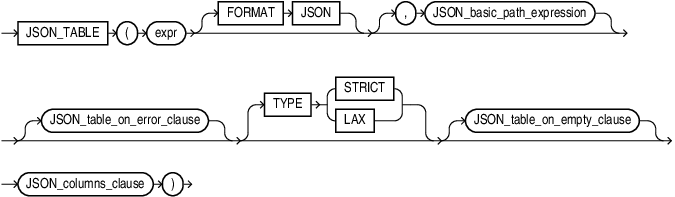
For expr, specify an expression that evaluates to a text literal. If expr is a column, then the column must be of data type VARCHAR2, CLOB, or BLOB.
The only explanation I have is that sample_data.j isn’t a VARCHAR2 although it looks suspiciously like one. But is it?
SQL> with sample_data(id, j) as (
  2   values
  3    (1, '{"a": "123", "b": 456, "c": {"d": 789}}'),
  4    (2, '{"a": 123, "b": "456", "c": {"d": 789}}'),
  5    (3, '{"a": 234, "b": "567", "c": {"d": 890}}')
  6  )
  7  select
  8   regexp_replace(
  9    dump(s.j),
 10    '(Typ=[[:digit:]]{2}).*',
 11    '\1'
 12   ) as data_type
 13  from
 14   sample_data s
 15  /

DATA_TYPE
------------------------------------------
Typ=96
Typ=96
Typ=96
Table 2-1 in Oracle’s SQL Language Reference identifies data type 96 as (N)CHAR. I think I’m on to something.
Solution
As it turned out I passed a fixed-length CHAR column to JSON_TABLE, which it understandably rejects. All I need to do is change the type to VARCHAR2. Here is one way to do that:
SQL> with sample_data(id, j) as (
  2   values
  3    (1, '{"a": "123", "b": 456, "c": {"d": 789}}'),
  4    (2, '{"a": 123, "b": "456", "c": {"d": 789}}'),
  5    (3, '{"a": 234, "b": "567", "c": {"d": 890}}')
  6  )
  7  select
  8   id,
  9   jt.a
 10  from
 11   sample_data s,
 12   json_table(
 13    cast (s.j as varchar2(4000)),
 14    '$'
 15    columns (
 16      a varchar2(10) path '$.a'
 17    )
 18  ) jt
 19  /

        ID A
---------- ----------
         1 123
         2 123
         3 234
And … we’re in business. Now I can move on to other topics I wanted to blog about :)
Appendix
Had I not required textual JSON input for JSON_TABLE I would have saved myself a lot of time :)
SQL> with sample_data(id, j) as (
  2   values
  3    (1, JSON('{"a": "123", "b": 456, "c": {"d": 789}}')),
  4    (2, JSON('{"a": 123, "b": "456", "c": {"d": 789}}')),
  5    (3, JSON('{"a": 234, "b": "567", "c": {"d": 890}}'))
  6  )
  7  select
  8   id,
  9   jt.a
 10  from
 11   sample_data s,
 12   json_table(
 13    s.j,
 14    '$'
 15    columns (
 16      a varchar2(10) path '$.a'
 17    )
 18  ) jt
 19  /

        ID A
---------- ----------
         1 123
         2 123
         3 234
No dramas – moral of the story (at least to me): use the JSON constructor whenever possible.
- it makes sure you are passing/storing well-formed JSON
- doesn’t require an
is_json()constraints - tolerates lax syntax
- produces a result respecting strict syntax rules
- produces a result that’s of the appropriate data type for all json functions and expressions
- many other things
In other words: the JSON constructor can, and most likely will, make your life easier.
 Martins Blog