While preparing a talk for Java developers I revisited the topic of code instrumentation. Within the database, for example when writing PL/SQL or MLE/JavaScript code, you would use DBMS_APPLICATION_INFO to set module and action plus any other details you care about. This allows your friendly database admin or tuning expert to understand your application better.
Rather than seeing a slow-running SQL statement, instrumentation shows you where in the code base you’re interacting with the database. This is such a great help and provides context. It also allows for more targeted tracing.
This is what you get without instrumentation:
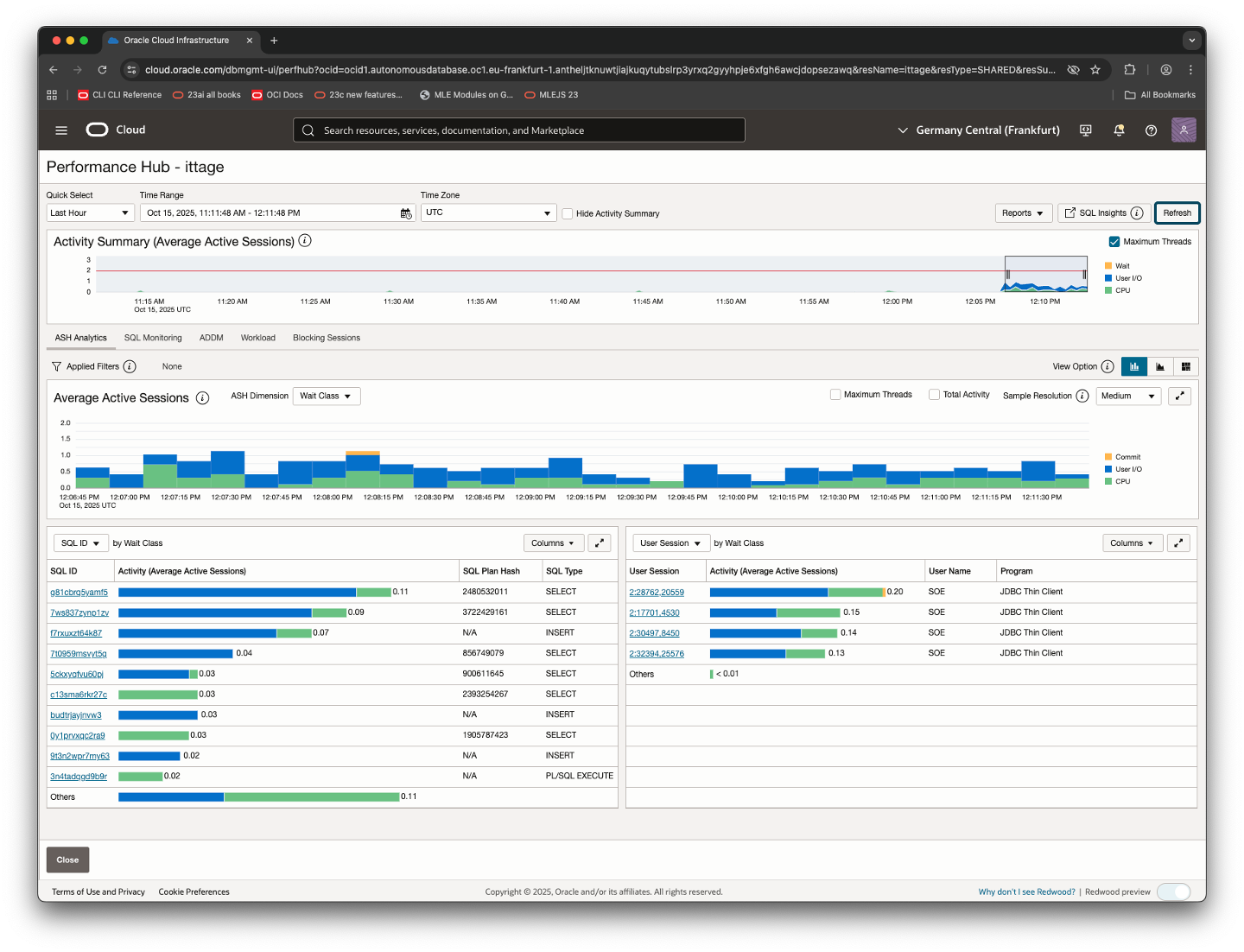
As you can see, that’s just a bunch of SQL statements.
Instrumenting code adds context. Now you can clearly identify what your code does, and where the time is spent. And since it’s always worth focusing on where time is spent and where it hurts, instrumentation should be of great help to you. Here is an example of the same workload, however with code instrumented and focused on:
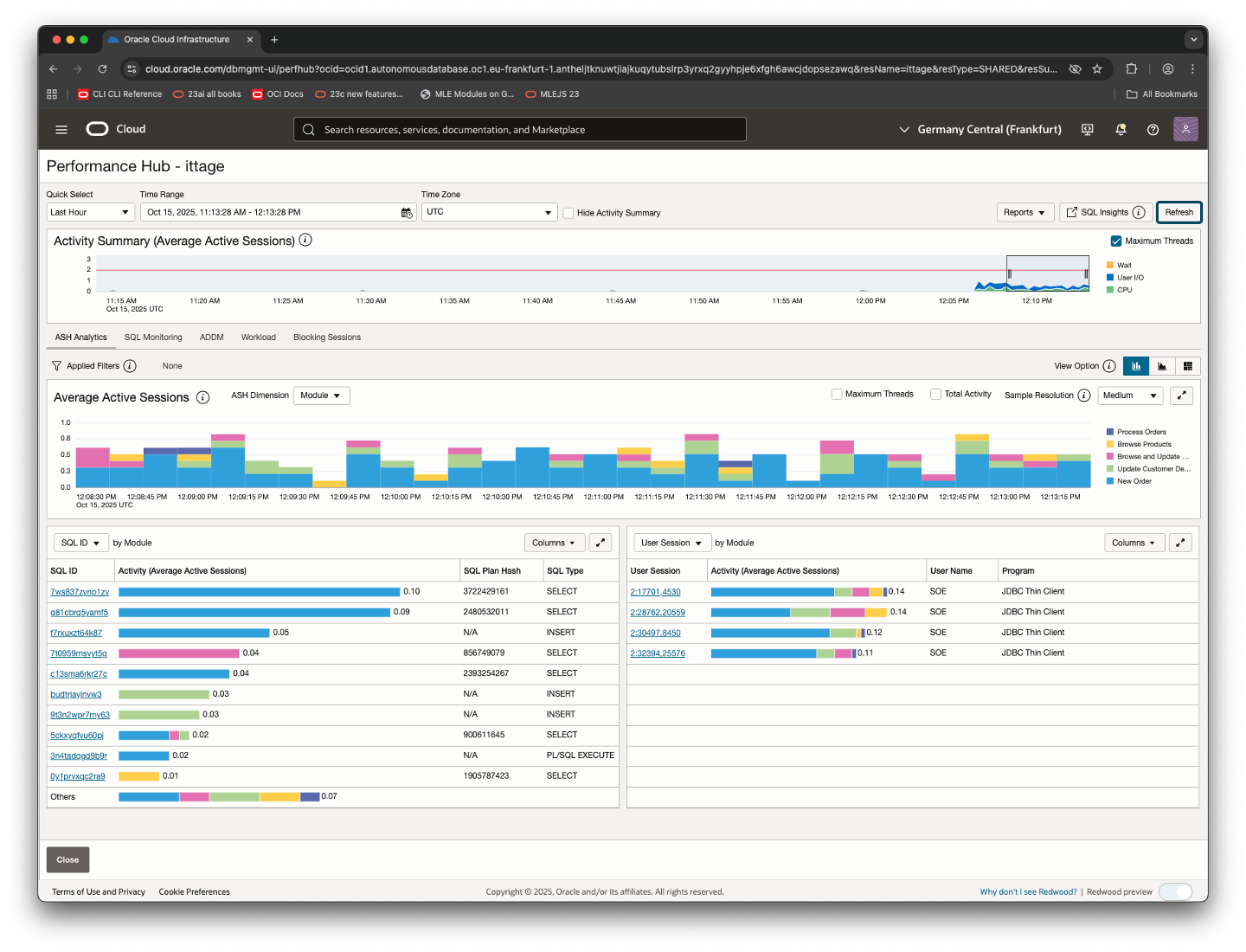
You can see the module names as provided by the application on the right-hand side of the Average Active Sessions graph.
Whereas code executing within the database suffers a lot less from it, instrumenting any client code adds latency due to an additional required round trip to the database. Thankfully there is a better way in Java JDBC by means of calling setClientInfo, this article shows you how to ship metadata with the next SQL statement.
Instrumenting JDBC
Here’s a quick example how to instrument your client-side JDBC code, and it shows a small gotcha, too. The complete example can be found on my GitHub, below is an except of App.java:
    public void run()
    {
        try {
            OracleConnection conn = OracleUCPDataSource.getPooledConnection();
            System.out.println("Successfully acquired a pooled OracleConnection.");

            conn.setClientInfo("OCSID.CLIENTID", "Some dude");
            conn.setClientInfo("OCSID.MODULE", "Demo Module");
            conn.setClientInfo("OCSID.ACTION", "simulate some workload");

            System.out.println("""
                    Module/Action and Client Info have been set - v$session is empty though
                    select sid, serial#, username, program, module, action, client_identifier from v$session where username = 'DEMOUSER'
                    """
            );
            Thread.sleep(30000);

            PreparedStatement pstmt = conn.prepareStatement("select user");
            ResultSet rs = pstmt.executeQuery();

            System.out.println("""
                    The metadata rode piggy-back on the previous query, check v$session again:
                    select sid, serial#, username, program, module, action, client_indentifier from v$session where username = 'DEMOUSER'
                    """
            );

            Thread.sleep(30000);

            while (rs.next()) {
                System.out.println("You are connected as " + rs.getString(1));
            }

            // return session to the pool
            conn.close();
            conn = null;

        } catch (SQLException e) {
            e.printStackTrace();
        } catch (InterruptedException e) {
            // nothing...
        }
    }
If you should run the application and check the database, you’ll see 2 things.
- Even though setClientInfo() is invoked 3 times in lines 7-9, v$session doesn’t change
- v$session is updated submitting a database request
Let’s run the application using your favourite IDE.
Real-life example
After a short moment, you’ll see the first message:
Successfully acquired a pooled OracleConnection.
Module/Action and Client Info have been set - v$session is empty though
select sid, serial#, username, program, module, action, client_identifier from v$session where username = 'DEMOUSER';
Switching to SQLcl or any other database client, you can see that the connection pool has been created and a number of sessions are allocated. You can also see the default module, identical to the main class name, has been set.
SQL> select sid, serial#, username, program, module, action, client_identifier from v$session where username = 'DEMOUSER';

SID SERIAL# USERNAME PROGRAM MODULE ACTION CLIENT_IDENTIFIER
___ _______ ________ _______ ______ ______ _________________
 19    7551 DEMOUSER App     App
 45    8714 DEMOUSER App     App
176   46472 DEMOUSER App     App
196   47666 DEMOUSER App     App
205   34813 DEMOUSER App     App
A few seconds later the application resumes, and proceeds with the database query:
The metadata rode piggy-back on the previous query, check v$session again:
select sid, serial#, username, program, module, action, client_indentifier from v$session where username = 'DEMOUSER';
This time you can see the updates in the database:
SQL> /

SID SERIAL# USERNAME PROGRAM MODULE      ACTION                 CLIENT_IDENTIFIER
___ _______ ________ _______ ___________ ______________________ _________________
 19    7551 DEMOUSER App     App
 45    8714 DEMOUSER App     App
176   46472 DEMOUSER App     App
196   47666 DEMOUSER App     App
205   34813 DEMOUSER App     Demo Module simulate some workload Some dude
In short, setClientInfo relies on the next database call you make (anyway) to update session metadata.
Summary
Setting module, action and client_info is essential for performance troubleshooting. Only with these details set can you relate (poor-performing) SQL statements to the front-end. If your code is instrumented troubleshooting is so much easier.
 Martins Blog
You must be logged in to post a comment.