Modern applications frequently need to access external services from within the database. In distributed architectures, those services are often exposed through REST APIs. Oracle APEX offers several declarative and programmatic ways to consume REST services, but a system administrator must first permit the necessary outbound network connectivity.
NOTE: APEX behaves ever so slightly differently in your self-hosted environment compared to Autonomous AI Database; this article applies to self-hosted systems. In this particular case you’ll see APEX 26.1.2 running on Oracle Database Free 23.26.2. The concepts should apply equally to earlier versions, too, but haven’t been explicitly tested. To keep things reasonably simple, direct outbound connectivity is assumed, in other words: proxies aren’t used. The concepts remain the same, except that there is an extra call to allow connections to the proxy required (here is an example)
Security first
Oracle AI Database aims to be secure by denying outbound network access by default unless it is explicitly authorized. It shouldn’t be possible to connect to an endpoint and drain data from the database.
For quite a while now the security rules are governed via Access Control Entries as described on oracle-base for example.
The lay of the land
Let’s start off with a vanilla system based on this compose file. My application is named NETWORK and lives in GENERIC_WS. The workspace is mapped to a single schema in the database, WKSP_GENERICWS
SQL> select 2 workspace, 3 owner, 4 alias 5 from 6 apex_applications 7 where 8 alias = 'NETWORK' 9* /WORKSPACE OWNER ALIAS_____________ _________________ __________GENERIC_WS WKSP_GENERICWS NETWORK
This is the default you get when creating a new PDB off PDB$SEED in Database Free 23.26.2 – exactly one ACE
SQL> SELECT 2 host, 3 lower_port, 4 upper_port, 5 principal, 6 grant_type, 7 inverted_principal, 8 privilege 9 FROM 10 dba_host_aces 11 ORDER BY 12* host;HOST LOWER_PORT UPPER_PORT PRINCIPAL GRANT_TYPE INVERTED_PRINCIPAL PRIVILEGE_______ _____________ _____________ ____________________ _____________ _____________________ ____________* GSMADMIN_INTERNAL GRANT NO RESOLVE
This ACE belongs to the Oracle-maintained GSMADMIN_INTERNAL account and is unrelated to the APEX application or its parsing schema.
Define a REST Data Source in APEX
Let’s try and access a REST service. In this example, the ORDS system providing the service is hosted in an adjacent container, named ords. There is nothing sophisticated about the service, it’s an auto-REST enabled table named emp.
Connecting to the database container instance, I can pull the data from ORDS easily:
$ curl -s http://ords:8080/ords/demouser/emp/ | jq .items[0]{ "empno": 7369, "ename": "SMITH", "job": "CLERK", "mgr": 7902, "hiredate": "1980-12-17T00:00:00Z", "sal": 800, "comm": null, "deptno": 20, "links": [ { "rel": "self", "href": "http://ords:8080/ords/demouser/emp/7369" } ]}
But when it comes to defining the REST Data Source, this doesn’t work. Don’t be confused by the fact that the browser is pointed at localhost: the ORDS container exposes port 8080 and that’s accessed. The REST call is made from within the database in the oracle container.

A quick look at the documentation explains why this doesn’t work. A host ACE is missing for APEX_260100, the owner of your APEX installation. Let’s add this (or ask your system administrator to do this for you, this task requires administrative privileges). Instead of hard-coding the APEX owner, let’s use the more portable apex_application.g_flow_schema_owner. Run these commands while connected to the appropriate PDB, not merely to CDB$ROOT assuming that you installed APEX in a PDB rather than the CDB (which you probably should).
begin dbms_network_acl_admin.append_host_ace( host => 'ords', lower_port => 8080, upper_port => 8080, ace => xs$ace_type( privilege_list => xs$name_list('http'), principal_name => apex_application.g_flow_schema_owner, principal_type => xs_acl.ptype_db ) );end;/PL/SQL procedure successfully completed.SQL> SELECT 2 host, 3 lower_port, 4 upper_port, 5 principal, 6 grant_type, 7 inverted_principal, 8 privilege 9 FROM 10 dba_host_aces 11 ORDER BY 12* host;HOST LOWER_PORT UPPER_PORT PRINCIPAL GRANT_TYPE INVERTED_PRINCIPAL PRIVILEGE_______ _____________ _____________ ____________________ _____________ _____________________ ____________* GSMADMIN_INTERNAL GRANT NO RESOLVEords 8080 8080 APEX_260100 GRANT NO HTTP
Oracle’s APEX installation guide grants the broader connect privilege. This example uses the narrower http privilege because only HTTP and HTTPS requests are required. The connect privilege may be necessary for other network operations supported by packages such as UTL_TCP, UTL_SMTP, or UTL_LDAP. Test the narrower grant against every APEX feature you intend to use.
Scope warning: This ACE is granted to the internal APEX owner, so it applies to the entire APEX instance, not only to this workspace or application. Restrict the hostname and port range as tightly as practical.
And just like that, the error is gone and you can create and use the REST Data Source:

Programmatic REST calls
Once the ACE is in place, APEX can also make programmatic REST calls using APIs such as APEX_WEB_SERVICE. For example:
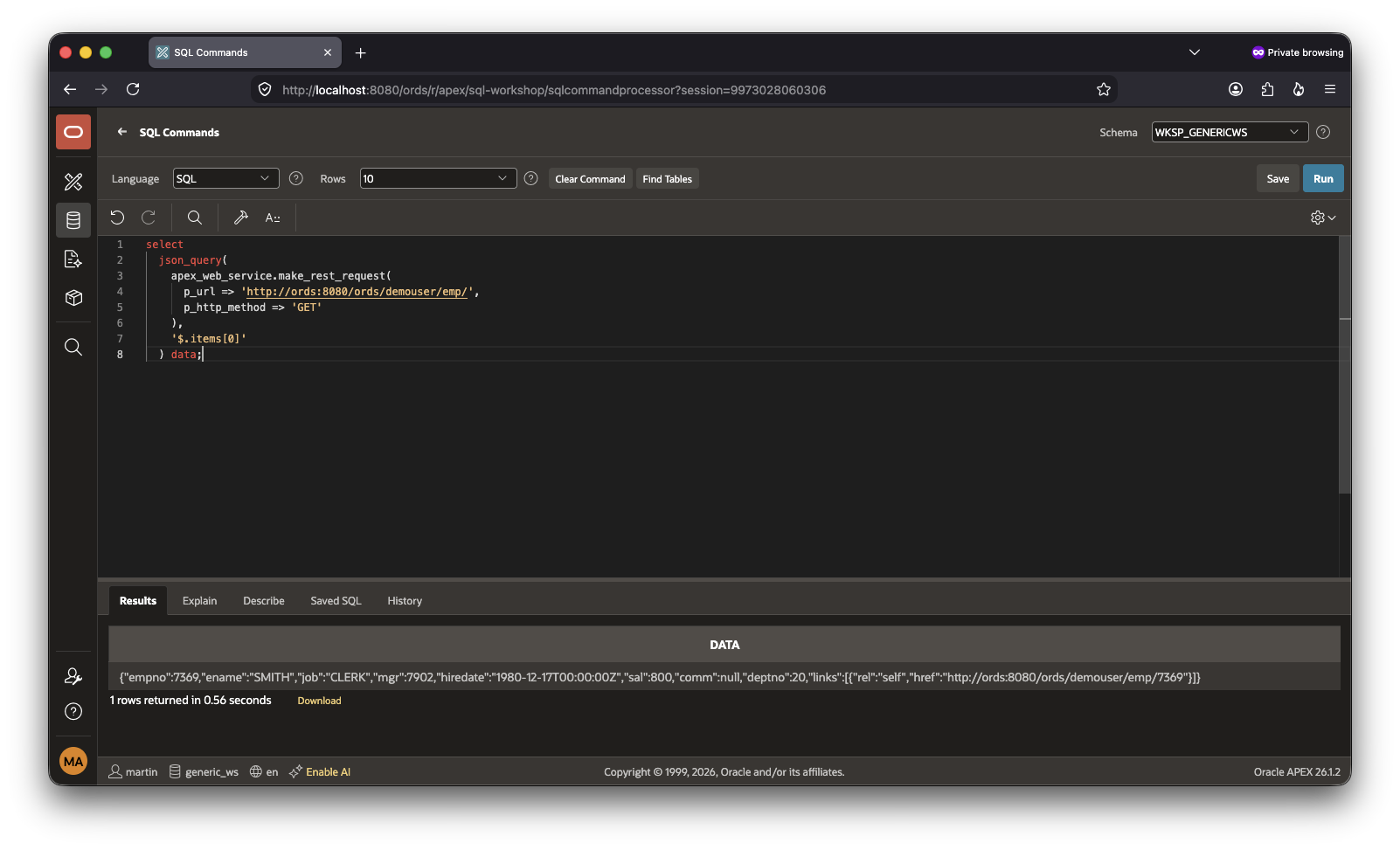
This extends to other areas such as Page Designer as well.
Generative AI Services
Like REST Data Sources discussed earlier, APEX Generative AI Services require outbound network access to their configured endpoints.. For instance, if you want to enable OCI-backed GenAI Services, you need to create an ACE for the endpoint shown in Base URL

In this case the endpoint is https://inference.generativeai.eu-frankfurt-1.oci.oraclecloud.com, the corresponding ACE can be defined as follows:
begin dbms_network_acl_admin.append_host_ace( host => 'inference.generativeai.eu-frankfurt-1.oci.oraclecloud.com', lower_port => 443, upper_port => 443, ace => xs$ace_type( privilege_list => xs$name_list('http'), principal_name => apex_application.g_flow_schema_owner, principal_type => xs_acl.ptype_db) );end;/
Host ACEs do not support arbitrary wildcard placement. For a domain mask, the wildcard must be at the beginning, for example *.oci.oraclecloud.com. A pattern such as inference.generativeai.*.oci.oraclecloud.com is invalid. For security reasons it’s best to create multiple host ACEs instead of one, with a wildcard.
The above ACE removes the database ACL restriction for that endpoint. The connection can still fail because of DNS, routing, firewall, proxy, TLS certificate, credential, IAM-policy, region, or service-configuration issues. But that’s a story for another day.
Using non APEX-APIs
There’s still room for one addendum. Let’s say you want to use a non-APEX API like UTL_HTTP, you need an extra ACE for your workspace’s parsing/default schema. As per the introduction, this is WKSP_GENERICWS. Without the extra ACE you get an error:
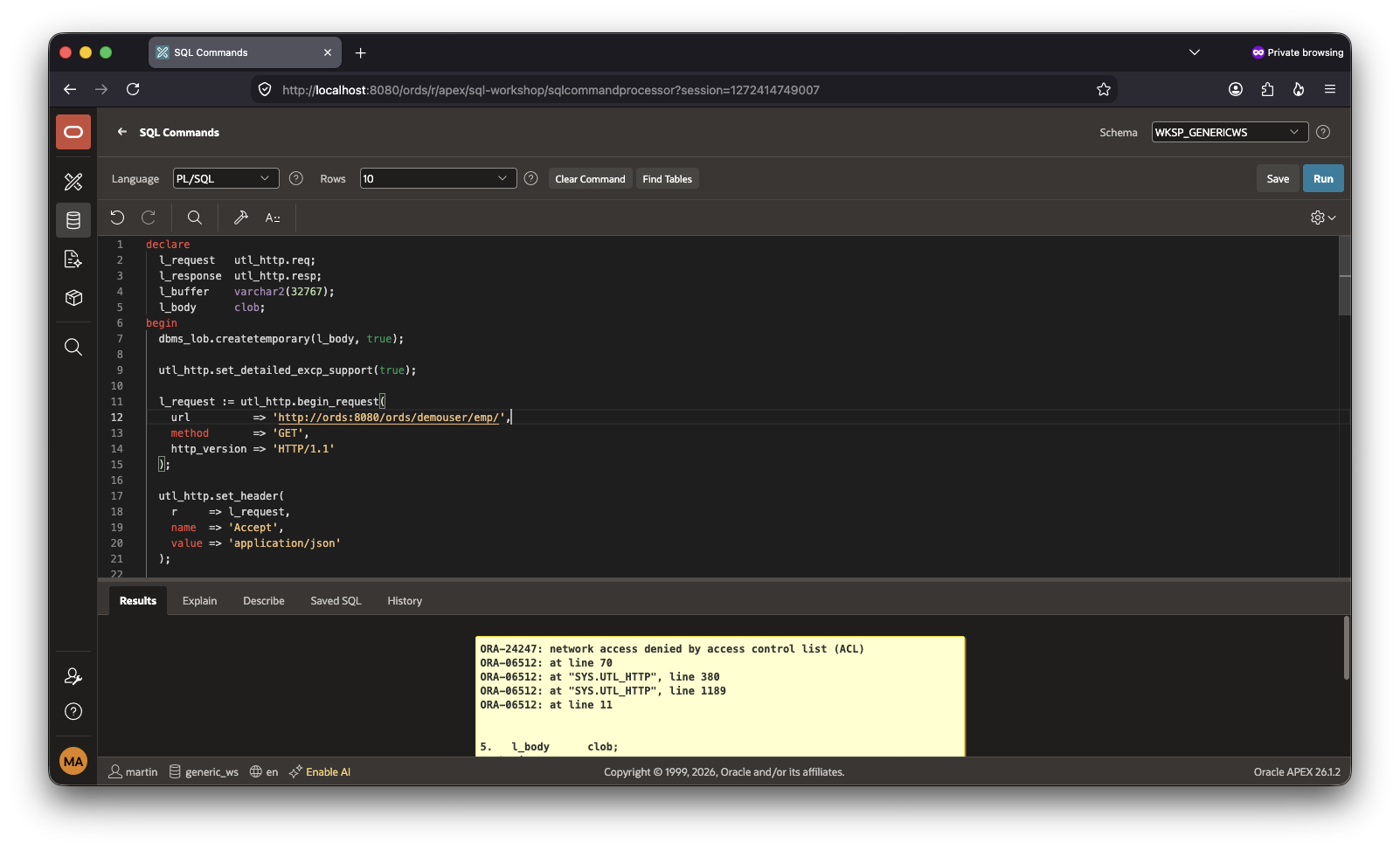
This is easily fixed:
begin dbms_network_acl_admin.append_host_ace( host => 'ords', lower_port => 8080, upper_port => 8080, ace => xs$ace_type( privilege_list => xs$name_list('http'), principal_name => 'WKSP_GENERICWS', principal_type => xs_acl.ptype_db ) );end;/
As before, things spring into life:
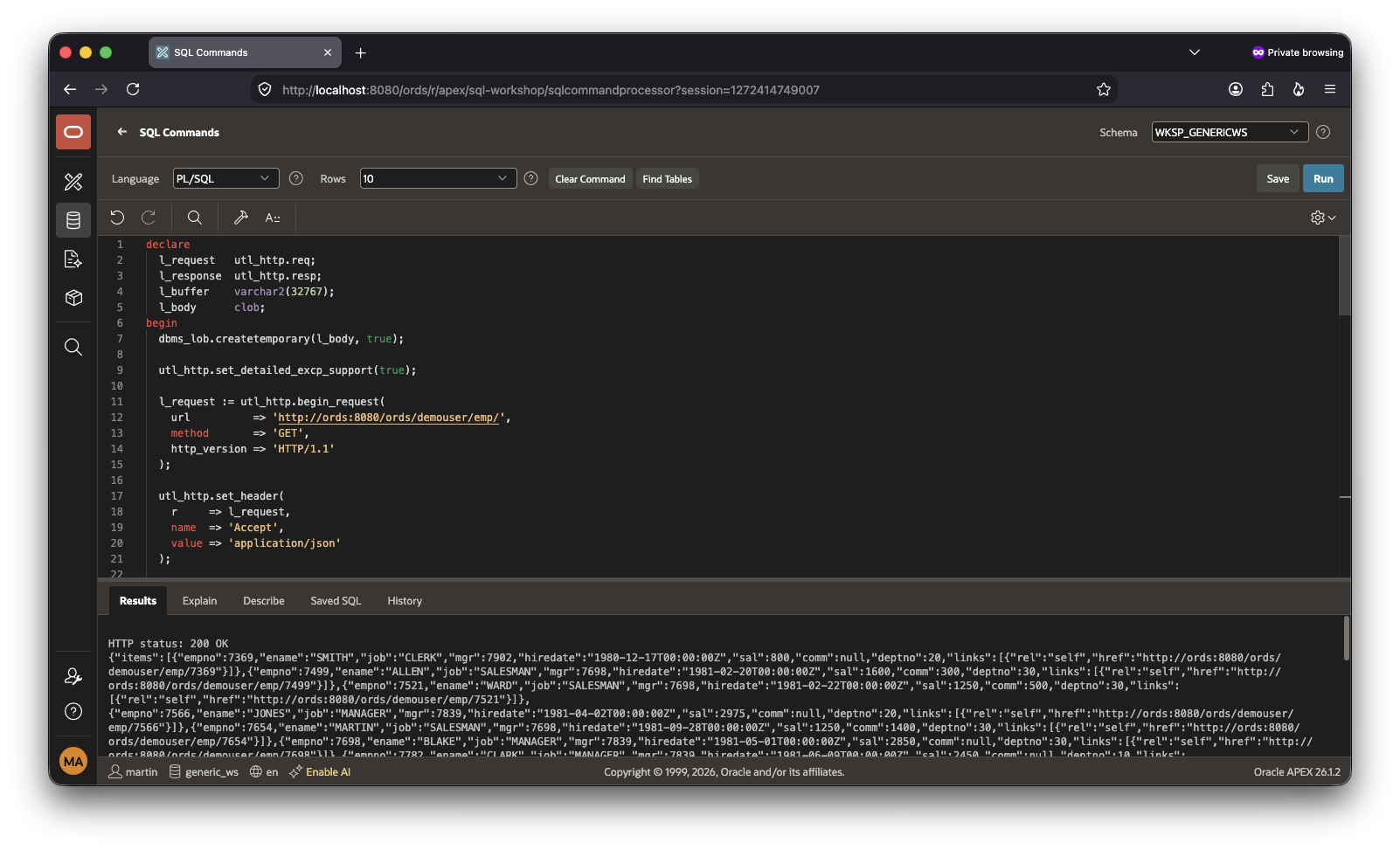
Summary
Self-hosted Oracle APEX requires explicit database network ACLs before applications can call external REST or Generative AI services. Grant the required privilege to the internal APEX owner, restrict access to the exact hostname and port wherever possible, and remember that the grant applies to the entire APEX instance rather than a single workspace.
Use exact regional OCI endpoints instead of invalid mid-host wildcards, and keep in mind that an ACL only permits the outbound connection. DNS, routing, TLS, credentials, and IAM configuration must also be correct.
 Martins Blog
You must be logged in to post a comment.