Oracle Multilingual Engine allows you to write server-side JavaScript code, use (license-compliant, security-vetted, etc.) third-party JavaScript modules in the database, and a lot more. The documentation includes two main resources:
- The JavaScript Developer’s Guide
- JSDoc covering the JavaScript modules shipped with the database
Documentation can be a bit abstract, and that’s because it must explain how to use a given technology in depth. It needs to cover edge cases, provide syntax and explanations. By its very nature, docs often aren’t very interactive, and this is where Oracle LiveLabs come into play.
LiveLabs provide you with a sandbox environment, let you experiment with a given topic without fear of breaking anything, or the worry and hassle of having to set up an environment first. LiveLabs are perfect for experimenting, learning, and getting those cherished aha! moments.
Simple Data Driven applications using JavaScript in Oracle AI Database 26ai
Until very recently, there was one MLE/JavaScript LiveLab: it teaches you the basics of the language, different use cases, using third party modules, tooling such as DB Actions and VSCode, and debugging strategies.
You can read more about it in this earlier blog post.
Full-Stack JavaScript with Oracle APEX and MLE
A new LiveLab has entered the scene!
MLE/JavaScript offers lots of new opportunities for APEX developers and they beg for a new LiveLab. This new LiveLab builds on a great idea championed by Oracle Ace Louis Moreaux: how to use an open-source JavaScript module to parse EXIF information from photos, all integrated into an APEX app.
The LiveLab takes this idea further, and enhances it to answer a simple question: is it possible to detect an AI-generated image, and tell it apart from a “real” photo? With the advances in AI the answer is “no”, but it’s possible to try. To this effect, you create an application that allows you to upload photos into the Oracle AI Database 26ai. Once uploaded, the EXIF information, including longitude and latitude are extracted provided metadata is associated with the photo. You can’t reliably tell a fake from a real image this way, but you can get clues.
🔗 enough of the talk, show me the LiveLab already!
The real work happens on the “photo metadata details page”: you can see the photo, its EXIF data, and a map showing where the photo was taken. The page also invokes an AI service, which is prompted to provide a qualitative assessment of whether the image appears to be AI-generated. The AI model receives the EXIF information as additional content to come up with a more detailed assessment.
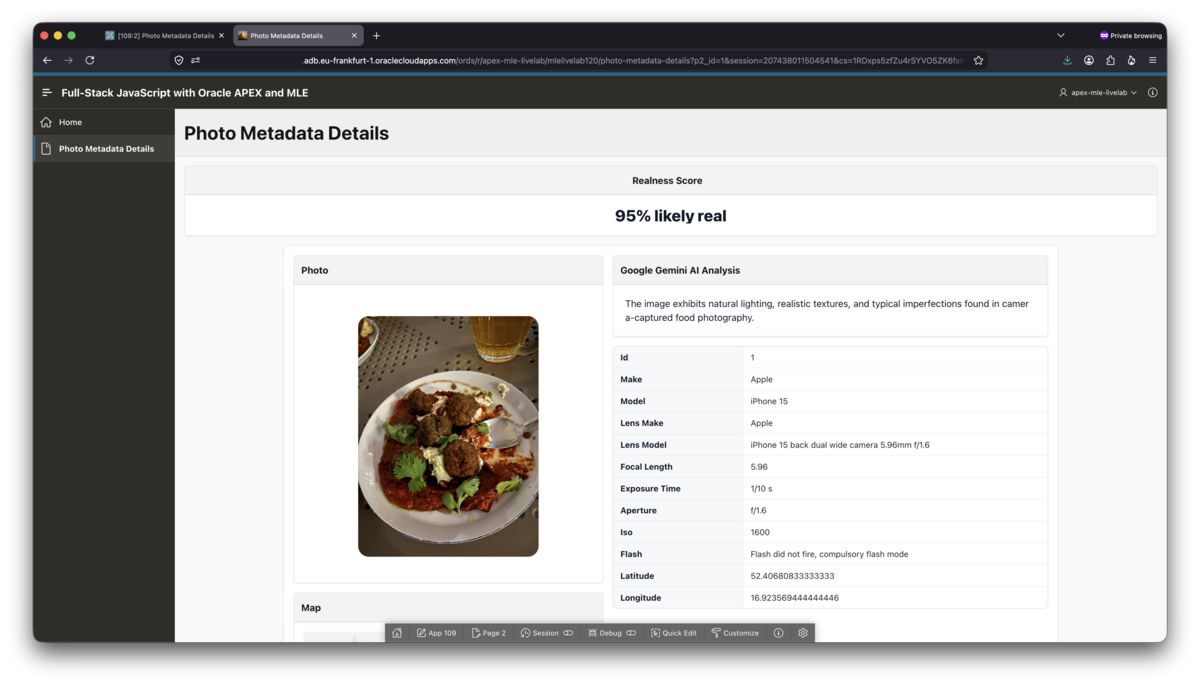
You can see the result of this in the screenshot above. While you build the application you will learn how to
- define and use Generative AI Services in APEX 26.1
- create JavaScript modules in APEX
- use JavaScript code in Page Designer
- add debugging information to JavaScript
If you are curious how to use server-side JavaScript with APEX, this LiveLab teaches you how to. Feedback is welcome, please use the usual channels.
Have fun!

