I have previously protected Oracle REST Data Services endpoints using the OAUTH management APIs. These have been replaced with the ORDS_SECURITY APIs. You can read the desupport notice in the ORDS_SECURITY package documentation:
Deprecation of OAUTH and OAUTH_ADMIN PL/SQL packages: Starting from Oracle REST Data Services release (ORDS) 24.3, the OAUTH and OAUTH_ADMIN PL/SQL packages are deprecated in favor of the ORDS_SECURITY and ORDS_SECURITY_ADMIN PL/SQL packages. Oracle will maintain backward compatibility with the earlier packages through ORDS release 25.2, after which the packages will be desupported starting from ORDS release 25.3 (October 2025).
Let’s look at what that means for ORDS 26.3.0, the current release at the time of writing. If you value a second opinion, as always, oracle-base.com has got you covered.
Setup
This post was written with Oracle AI Database 23.26.3 and ORDS 26.3.0 running from my default compose file. To keep things simple I created a single REST endpoint that converts an epoch timestamp to a date humans understand. No database setup required, apart from the ORDS installation and the REST module definition. The intention is to focus on the creation of the OAuth2 client, not the code.
Testing the unprotected endpoint in your development environment
Before pushing code into the wild (= production) it’s important to test it first. This is what you typically do in your test environment. I often create an unprotected endpoint first before securing it, it makes for easier testing. The following PL/SQL snippet is run as emily, a database account enabled to execute MLE/JavaScript. JavaScript’s Date object makes conversion between epoch and date trivial.
begin ords.enable_schema; ords.define_module( p_module_name => 'epoch_api', p_base_path => '/epoch/', p_status => 'PUBLISHED', p_comments => 'Convert Unix epoch seconds to a UTC date using MLE JavaScript' ); ords.define_template( p_module_name => 'epoch_api', p_pattern => ':epoch_seconds' ); ords.define_handler( p_module_name => 'epoch_api', p_pattern => ':epoch_seconds', p_method => 'GET', p_source_type => 'mle/javascript', p_items_per_page => 0, p_mle_env_name => null, p_source => q'~(req, resp) => { resp.content_type('application/json'); const value = req.uri_parameters.epoch_seconds; if (typeof value !== 'string' || !/^-?[0-9]{1,12}$/.test(value)) { resp.status(400); resp.json({ error: 'epoch_seconds must be an integer timestamp in seconds' }); return; } const seconds = Number(value); if (!Number.isSafeInteger(seconds) || seconds < -62135596800 || seconds > 253402300799) { resp.status(400); resp.json({ error: 'epoch_seconds must represent a UTC date in years 0001 through 9999' }); return; } // JavaScript Date uses milliseconds. The bounds above restrict the result // to UTC calendar years 0001 through 9999 before formatting it as ISO 8601. const date = new Date(seconds * 1000); resp.status(200); resp.json({ epoch_seconds: seconds, date: date.toISOString(), time_zone: 'UTC' });}~' ); commit;exception when others then rollback; raise;end;/
Continue only if the test succeeds, as shown here:
$ curl --silent --fail-with-body https://your-host/ords/emily/epoch/1793026461 | jq .{ "epoch_seconds": 1793026461, "date": "2026-10-26T14:54:21.000Z", "time_zone": "UTC"}
Notice how p_status in ords.define_module is set to PUBLISHED. This is only ever safe in your secure lab/test/dev environment. I strongly discourage publishing REST endpoints without security! Therefore, when publishing the REST endpoint in your code, you should follow these steps in my opinion:
- Create the ORDS module in status
NOT_PUBLISHED - Create the necessary roles, privileges, and OAuth2 client (if that’s your authentication model, there are others…)
- Assign these to the endpoint
- Change the ORDS module’s status to
PUBLISHED
Time to protect the REST endpoint!
Protecting the REST endpoint
The REST endpoint is intended for machine-to-machine communication, an OAuth2 client will suffice. Here is the amended script following the approach laid out earlier. The JavaScript handler and PL/SQL code are better documented, your colleagues will thank you.
set serveroutput onspool offdeclare -- Holds the generated client ID and secret for a newly registered client. l_client_creds ords_types.t_client_credentials; -- ORDS uses indexed arrays to associate privileges with roles and modules. l_priv_roles owa.vc_arr; l_priv_patterns owa.vc_arr; -- Empty: protection is assigned by module below. l_priv_modules owa.vc_arr;begin ords.define_module( p_module_name => 'epoch_api', p_base_path => '/epoch/', -- Publish only after the privilege and client role have been configured. p_status => 'NOT_PUBLISHED', p_comments => 'Convert Unix epoch seconds to a UTC date using MLE JavaScript' ); -- Capture the final URL segment as req.uri_parameters.epoch_seconds. ords.define_template( p_module_name => 'epoch_api', p_pattern => ':epoch_seconds' ); -- ORDS authenticates/authorizes requests before invoking this JavaScript. ords.define_handler( p_module_name => 'epoch_api', p_pattern => ':epoch_seconds', p_method => 'GET', p_source_type => 'mle/javascript', p_items_per_page => 0, p_mle_env_name => null, -- No imported MLE modules are needed. p_source => q'~(req, resp) => { resp.content_type('application/json'); // Check the original string before Number() can coerce other numeric forms. const value = req.uri_parameters.epoch_seconds; // Accept decimal digits with an optional minus sign; reject fractions, // exponent/hex notation, whitespace and excessively long inputs. if (typeof value !== 'string' || !/^-?[0-9]{1,12}$/.test(value)) { resp.status(400); resp.json({ error: 'epoch_seconds must be an integer timestamp in seconds' }); return; // json() sends the response; do not continue with conversion. } // Require exact integer representation and constrain the UTC date range: // 0001-01-01T00:00:00Z through 9999-12-31T23:59:59Z, inclusive. const seconds = Number(value); if (!Number.isSafeInteger(seconds) || seconds < -62135596800 || seconds > 253402300799) { resp.status(400); resp.json({ error: 'epoch_seconds must represent a UTC date in years 0001 through 9999' }); return; } // JavaScript Date uses milliseconds. The bounds above restrict the result // to UTC calendar years 0001 through 9999 before formatting it as ISO 8601. const date = new Date(seconds * 1000); resp.status(200); resp.json({ epoch_seconds: seconds, date: date.toISOString(), // ISO 8601 in UTC, including .000Z. time_zone: 'UTC' });}~' ); -- the following calls to the ORDS security model protect the endpoint. To keep it simple -- the code assumes a fresh-setup example; it does not include logic to reuse an existing client. -- This is an ORDS authorization role, not an Oracle Database role. ords.create_role(p_role_name => 'epoch_api_role'); -- Require the dedicated role for every handler in the epoch_api module. l_priv_roles(1) := 'epoch_api_role'; l_priv_modules(1) := 'epoch_api'; ords.define_privilege( p_privilege_name => 'epoch.api.privilege', p_roles => l_priv_roles, p_patterns => l_priv_patterns, p_modules => l_priv_modules, p_label => 'Epoch API access', p_description => 'Access to the epoch conversion endpoint' ); -- Client credentials identify a calling application; no user sign-in occurs. l_client_creds := ords_metadata.ords_security.register_client( p_name => 'epoch_api_client', p_grant_type => 'client_credentials', p_support_email => 'someone@example.com', p_description => 'Client permitted to use the epoch conversion endpoint', -- Ask ORDS to generate a secret; do not embed one in this script. p_client_secret => ords_constants.oauth_client_secret_default, p_privilege_names => 'epoch.api.privilege', -- Authenticate at /oauth/token using the client ID and secret. p_token_endpoint_auth_method => 'CLIENT_SECRET_BASIC' ); dbms_output.put_line('CLIENT_ID: ' || l_client_creds.client_key.client_id); -- Retain this value securely, the secret must be rotated in case you forget to save it dbms_output.put_line('CLIENT_SECRET: ' || l_client_creds.client_secret.secret); -- Tokens issued for this client can satisfy the privilege's role requirement. ords_metadata.ords_security.grant_client_role( p_client_name => 'epoch_api_client', p_role_name => 'epoch_api_role' ); -- Make the endpoint available only after its access controls are configured. ords.publish_module( p_module_name => 'epoch_api', p_status => 'PUBLISHED' ); -- Persist the configuration commit;exception when others then -- Undo uncommitted metadata changes and report setup failures to the caller. rollback; raise;end;/
The second half of the script mandates authorisation for the epoch module. The privilege protects the epoch API module and requires the epoch_api_role role. Granting that role to the OAuth client allows its client credentials tokens to satisfy the privilege. ORDS performs this check before invoking the JavaScript handler.
You get HTTP 401 errors and a descriptive error message if you try accessing it:
curl --silent --show-error --include --fail-with-body https://your-host/ords/emily/epoch/1793026461https://your-host/ords/emily/epoch/1793026461HTTP/1.1 401 UnauthorizedContent-Type: application/problem+jsonWWW-Authenticate: Bearer realm="Oracle REST Data Services", resource_metadata="https://your-ords-host/.well-known/oauth-protected-resource/ords/emily/epoch/1793026461"Content-Length: 182{ "code": "Unauthorized", "message": "Unauthorized", "type": "tag:oracle.com,2020:error/Unauthorized", "instance": "tag:oracle.com,2020:ecid/Z5Krq_raCElJE-k_GyuiLw"}
Note that the PL/SQL block prints the client ID and the initial secret. It is highly likely that this is not appropriate for your processes and environments. This applies in particular if you’re deploying via CI/CD! This is just a little demo, please adjust as necessary for your particular environment! Write these down, you have to rotate the secret if you don’t.
You need client ID and secret to generate bearer tokens.
CLIENT_ID="..."curl --fail-with-body --user "${CLIENT_ID}" \--data 'grant_type=client_credentials' \https://your-host/ords/emily/oauth/token
Enter the client secret when prompted. If your client ID and secret are correct, ORDS provides a bearer token:
curl ... https://your-host/ords/emily/oauth/token{"access_token": "....","token_type":"bearer","expires_in":3600}
As soon as you have access to the bearer token, you can query the endpoint:
TOKEN="...."curl --silent --fail-with-body \--header "Authorization: Bearer ${TOKEN}" \https://your-host/ords/emily/epoch/1793026461{"epoch_seconds":1793026461,"date":"2026-10-26T14:54:21.000Z","time_zone":"UTC"}
That’s it! The REST endpoint is now protected, and only those users authorised can use it. If you prefer a graphical user interface, Database Actions is your friend:
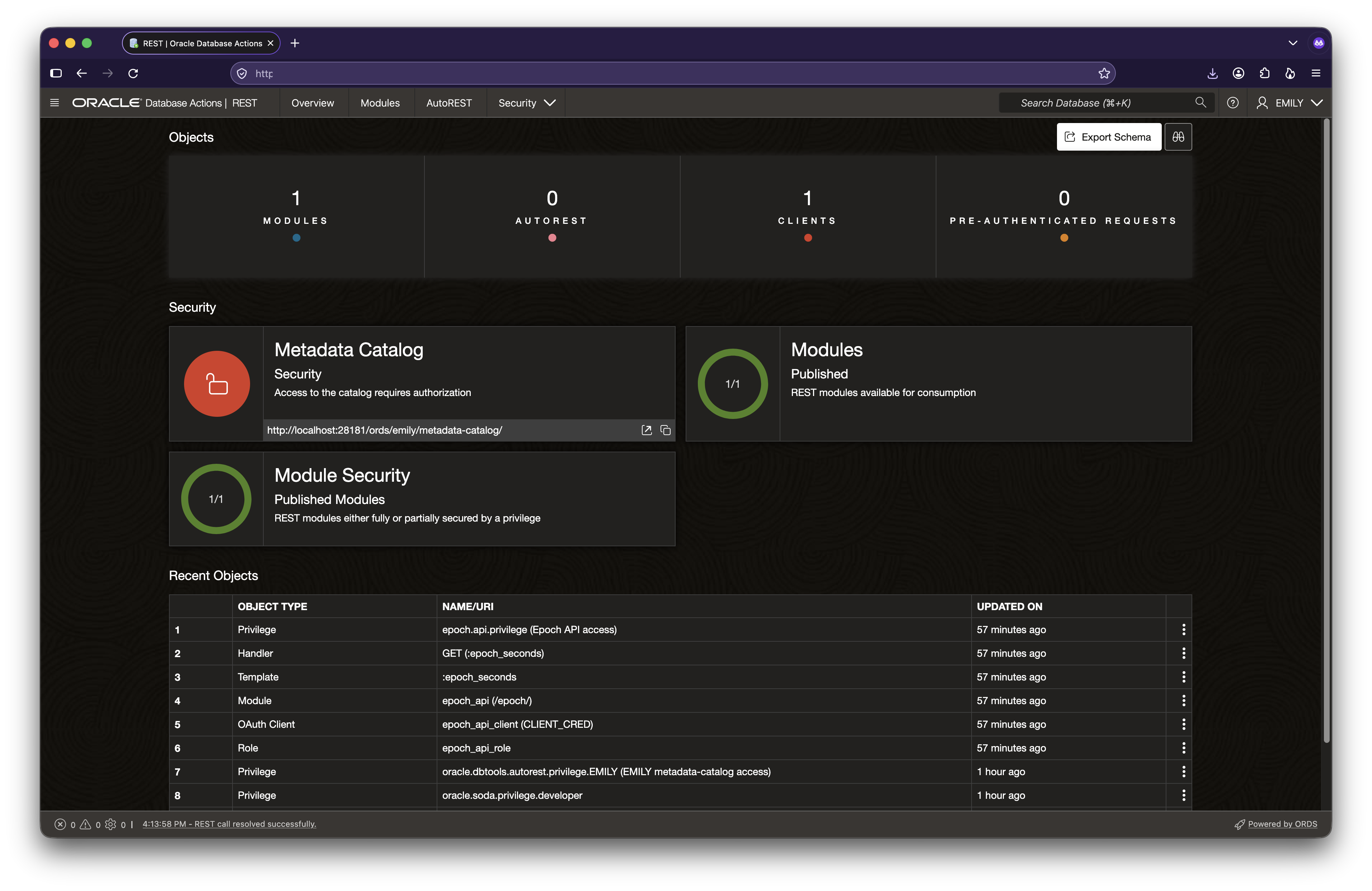
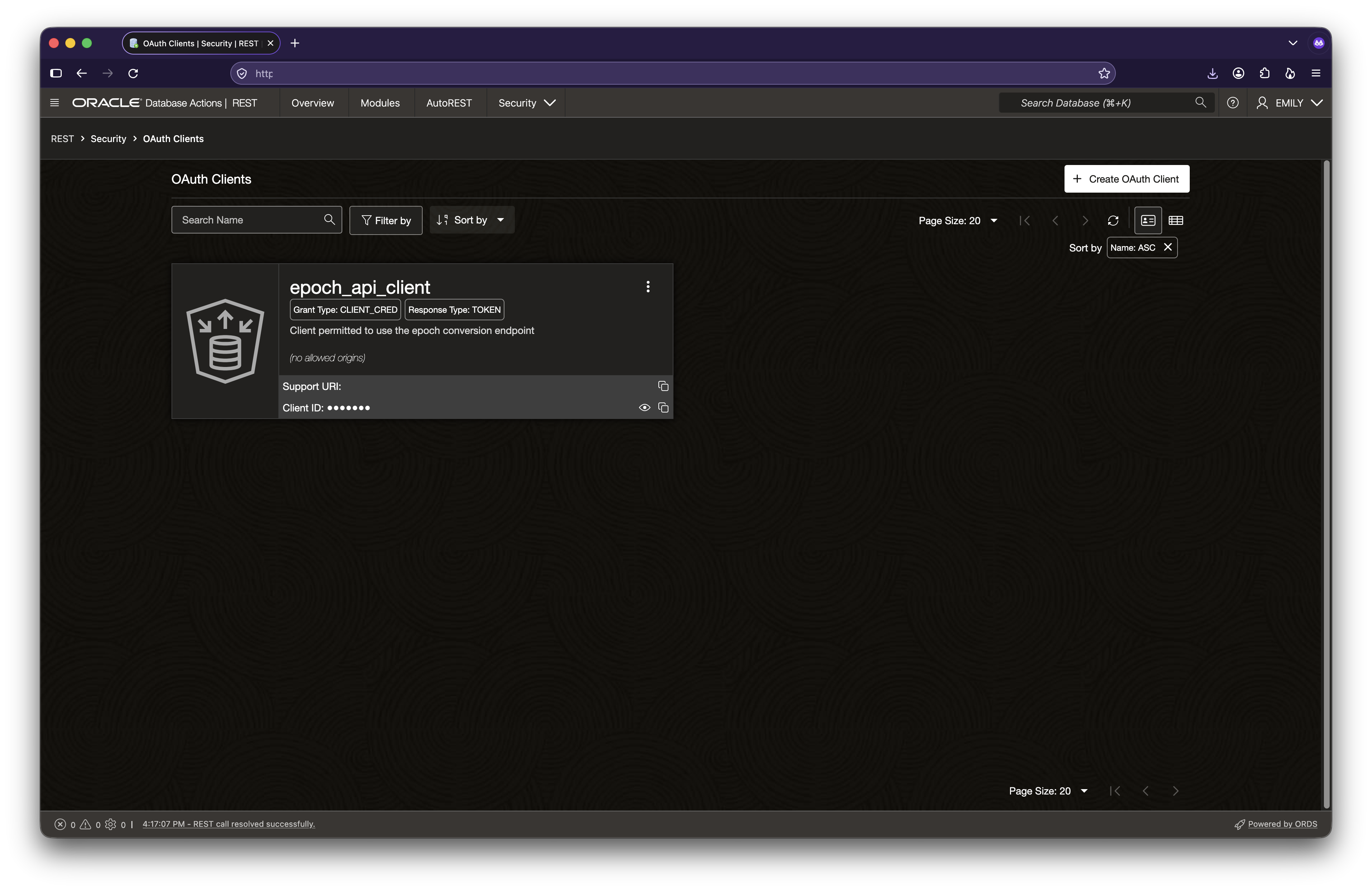
You can see the module name, the fact that the module is protected. Use the Security drop down in the menu to access roles, privileges, and clients:
References
The following references have been used when creating this article.
| Script feature | Documentation reference |
|---|---|
JavaScript handler syntax, 'mle/javascript', and p_mle_env_name | Developing REST Applications — “Manually Creating RESTful Services Using Javascript” |
req.uri_parameters, resp.content_type(), resp.status(), and resp.json() | Developing REST Applications — “About Request and Response Objects” |
ORDS.DEFINE_MODULE, ORDS.DEFINE_TEMPLATE, and ORDS.DEFINE_HANDLER | ORDS PL/SQL Package Reference |
ORDS.CREATE_ROLE and ORDS.DEFINE_PRIVILEGE, including module and role associations | ORDS PL/SQL Package Reference |
ORDS.PUBLISH_MODULE and publication status | ORDS PL/SQL Package Reference |
ORDS_SECURITY.REGISTER_CLIENT, client credentials, generated secrets, and CLIENT_SECRET_BASIC | ORDS_SECURITY PL/SQL Package Reference — “REGISTER_CLIENT” |
Assigning epoch_api_role to the client | ORDS_SECURITY PL/SQL Package Reference — “GRANT_CLIENT_ROLE” |
| Replacing a lost client secret | ORDS_SECURITY PL/SQL Package Reference — “ROTATE_CLIENT_SECRET” |
Choosing client credentials, obtaining a token at /oauth/token, and sending Authorization: Bearer | Developing REST Applications — “Configuring Secure Access to RESTful Services” |
| Alternative authentication using an external identity provider | Developing REST Applications — “JWT Bearer Token Authentication and Authorization Using JWT Profile” |


You must be logged in to post a comment.