It seems like every week brings a new AI breakthrough that promises to change software development. The pace of innovation is accelerating rapidly, making it difficult to keep up with the latest tools, models, and workflows. Coding agents such as Claude Code, Codex, Cline, and GitHub Copilot are built on top of large language models (LLMs). The LLM provides reasoning and language understanding, while the agent adds planning, tool usage, and the ability to take actions on behalf of the user.
Yet when it comes to Oracle-specific technologies, they do not always provide the most accurate or effective answers. To remedy this, you can augment your LLM with additional things such as
- Agent Skills
- Model Context Protocol
Agent Skills help teach coding agents Oracle-specific knowledge and workflows, while the Model Context Protocol (MCP) provides a standardized way for those agents to interact with databases and other external systems.
Understanding how these pieces fit together is key to building an efficient and effective AI-based development toolchain.
The Big Picture
A picture is worth a thousand words, so let’s start with one. You can see how agents, large language models, skills, and the MCP are interwoven.
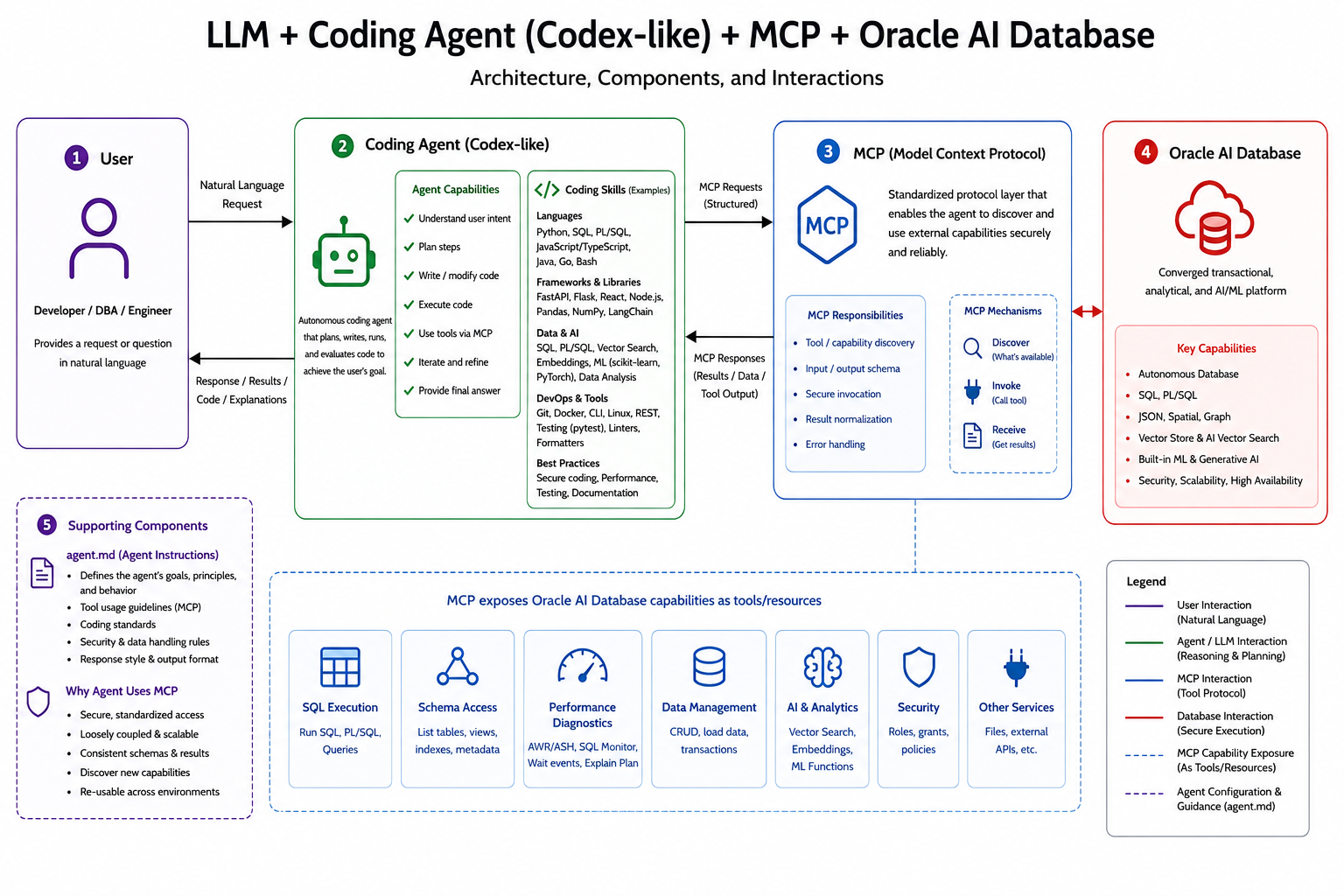
Many of you already use Visual Studio Code, or VSCode, along with Oracle’s SQL Developer for VS Code extension. Not only is VSCode a very popular editor, it also has a rich extension ecosystem. You might have tools like Cline, Codex, or Copilot installed. Some of these extensions provide agent functionality inside the editor. Unlike the chat interfaces many of us first used, agents can take actions on your behalf.
Agents can also be extended with specialized instructions and workflows, which is where agent skills come in. Oracle has published a large catalog of these for its database, APEX, and other products on GitHub.
To work with external systems, agents usually need tools and integrations. That is where the Model Context Protocol, or MCP, comes in. MCP provides a standardised way for agents to discover and use tools, access resources, and interact with external systems. In practice, an MCP server might expose capabilities such as connecting to an Oracle Database, running a SQL query, or creating a new issue in a GitHub project. MCP follows a client/server model. The coding agent acts as the MCP client, while systems such as SQLcl expose capabilities through MCP servers. The agent discovers available tools, invokes them through MCP, and receives structured results in return.
Oracle’s SQLcl integrates an MCP Server. There are more options available to connect an agent to an Oracle AI Database, but let’s focus on this particular scenario for this article.
Health & Safety first
Do NOT, under any circumstances, connect your coding agent to the production database. AI can make poor decisions, and you don’t want it to make irrevocable changes to things that matter. And besides, all your changes should really undergo your usual CI Pipeline’s vetting.
As Jeff Smith said, “AI/LLM/MCP technology amplify the need for security around your database.” If you allow your agent to connect to the database via SQLcl’s MCP Server, use least-privileged accounts, technology such as Deep Data Security, audit everything meticulously, and follow all the other industry best-known methods when it comes to security. You also want to make sure that the coding agents asks you to confirm anything it does, auto-approve is the setting to avoid like the plague and YOLO is not an option!
How do I get there?
If you understand the implications of using AI and have obtained approval from your manager to use it, you’re off to a good start.
Coding Agent
The choice of coding agent is typically a very personal one, or you get one mandated by your employer. In any case, you can often use the coding agent in a terminal, or a dedicated desktop application. There are plugins for VSCode as well. The configuration is pretty specific, just make sure you use the agent with the model that best suits your demands.
The coding agent must be able to access one of the Large Language Models. In Codex you probably use one of the ChatGPT models, Claude might use Anthropic’s models such as Sonnet or Opus, etc. The details how to set these up are typically up to your employer, and totally out of scope of this article.
SQLcl as your MCP Server
SQLcl ships with the SQLDeveloper for VSCode extension, so you don’t need to install anything. If you prefer to download and use it alongside the extension you can grab a copy from oracle.com/sqlcl. You may have to tell your coding agent software about it though, the exact instructions depend on your coding agent. For example, if you use codex you need to update the main configuration file, ~/.codex/config.toml to add a section about the SQLcl MCP Server. There’s a codex command to do so, or you edit the file with your favourite editor.
SQLcl relies on saved connections to interact with your databases (did you read the warning above?!) Once they are in place you are good to use the SQLcl MCP Server. Please head over to the documentation for more details.
Agent Skills
As you read earlier, Oracle published a large catalog of agent skills on GitHub for you to use. But how do you get them to be part of your project? There are 2 ways to do so:
- Install the skills via SQLcl
- Manually install them
Let’s look at both options.
SQLcl-based installation
Agent skills can be installed via SQLcl:
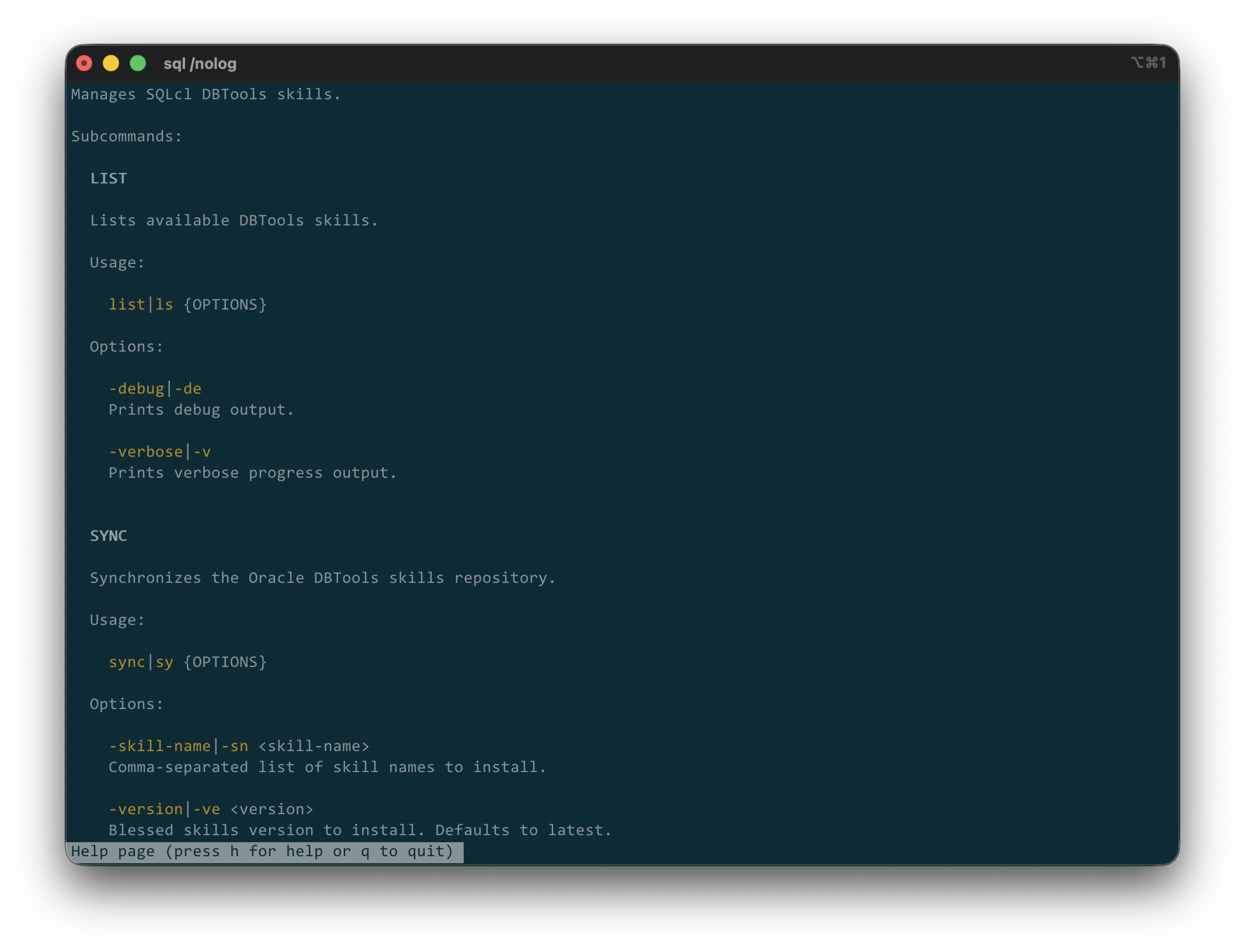
Using SQLcl is probably the easiest method to keep the Oracle Agent Skills up-to-date, if you like to see this in more detail, have a look at this blog post.
Manual Installation
Alternatively, if you have a node runtime on your machine you can use the npx skills add oracle/skills command as shown in this screenshot
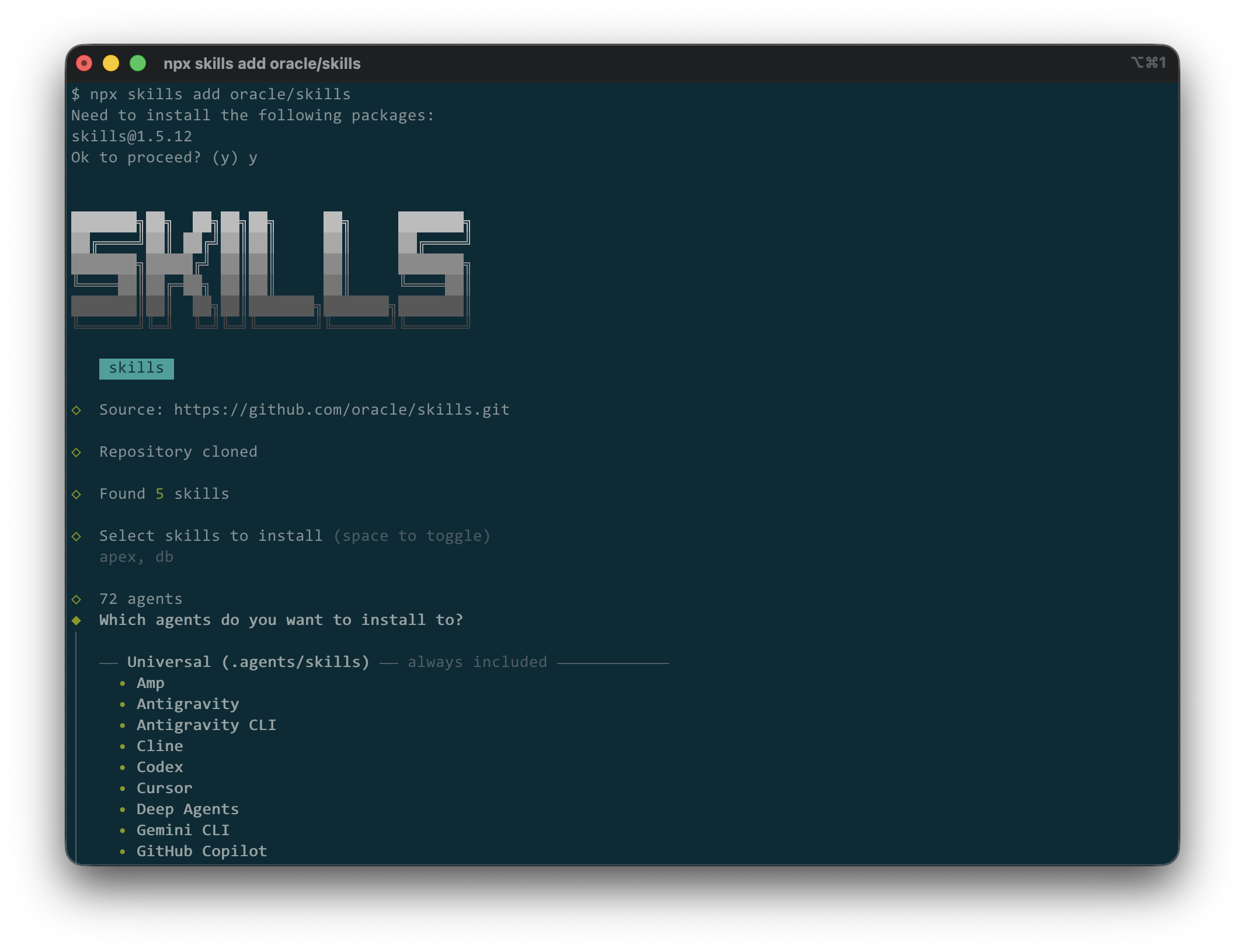
Now these skills have been added to your project.
With the skills installed, you can now ask your coding agent to explain an execution plan, generate an APEX component, review a SQL statement for performance issues, or help write PL/SQL code. The agent can combine the Oracle-specific guidance provided by the skills with live information obtained through MCP-enabled tools. But it doesn’t have to. You can analyse anything offline, too.
Directory Structure
The directory structure you use for your coding project depends mostly on the project’s language(s), but there are some AI-related files you may want to consider. An APEX application based on SQLcl project’s workflow might look like this. Some files in the directory are directly related to AI Coding Agents.
.├── .agents # Repo-local AI agent assets (in addition to the "global" ones in ~/.agents/skills)│ └── skills # Custom skills available to agents│ └── my-skill # One project-specific skill│ └── SKILL.md # Skill metadata and instructions├── .dbtools # SQLcl Projects configuration│ ├── filters # SQLcl export/stage filters│ │ └── project.filters│ ├── project.config.json # Main SQLcl project settings│ └── project.sqlformat.xml # SQL formatting configuration├── .git # Git repository metadata├── .gitignore # Ignored generated/local files├── AGENTS.md # Instructions for AI agents working here├── README.md # Human-facing project overview├── artifact # Generated packaged artifacts│ └── demoapp-1.0.0.zip├── dist # Deployable/generated release output│ ├── env # Liquibase/SQLcl deployment properties│ │ └── default.properties│ ├── install.sql # Main SQLcl install/update entrypoint│ ├── releases # Liquibase release changelog tree│ │ ├── 1.0.0 # Versioned backend release│ │ │ ├── changes # Generated change groups│ │ │ │ └── backend-1 # Backend database object changes│ │ │ └── release.changelog.xml│ │ ├── apex # APEX deployment changelogs/exports│ │ │ ├── apex.changelog.xml│ │ │ └── f100 # APEX application 100 deployment files│ │ └── main.changelog.xml # Root Liquibase changelog│ └── utils # Optional SQLcl helper scripts│ ├── prechecks.sql│ └── recompile.sql├── login.sql # SQLcl startup/session settings└── src # Source of truth for project objects └── database # Database source tree └── demo_ws_owner # Application/schema owner source ├── apex_apps # APEX application source exports │ └── f100 │ ├── demoapp │ │ ├── .apex │ │ │ └── apexlang.json │ │ ├── application.apx │ │ ├── deployments │ │ │ └── default.json │ │ ├── page-groups.apx │ │ ├── pages │ │ └── shared-components │ └── f100.sql ├── mle_envs # Oracle MLE environment definitions ├── mle_modules # Oracle MLE JavaScript/SQL modules └── tables # Table DDL source
In this example, Oracle’s Agent Skills are deployed in $HOME/.agents/skills and therefore available to all projects. The are augmented by project-specific ones in the $CWD/.agents/skills directory.
The agents.md file (🔗 to docs) is consumed by your coding agent. It acts as the counter part to the readme.md, which is intended to be read by you and me. As per the previously mentioned docs, AGENTS.md complements this [readme.md] by containing the extra, sometimes detailed context coding agents need: build steps, tests, and conventions that might clutter a README or aren’t relevant to human contributors.
Summary
The rise of AI coding agents is changing how software is built, and it has done so for a while. Google’s DORA Report for 2025 cites that 90% of all respondents use AI for for their daily work. AI agents become far more useful when equipped with the right context and integrations. Oracle Agent Skills provide Oracle-specific knowledge and workflows, while SQLcl MCP offers a standardized way for agents to interact with Oracle AI Database. Further MCP Servers allow additional interactions with external systems.
As exciting as these capabilities are, they should be adopted responsibly. Follow established security practices, use least-privileged accounts, keep humans in the approval loop, and make sure to audit, trace and track everything. With the right safeguards in place, Oracle Agent Skills and MCP can become valuable additions to a modern AI-powered development stack.
But don’t be fooled: AI coding agents complement established engineering practices; they do not replace code reviews, testing, security controls, or robust CI/CD pipelines.


You must be logged in to post a comment.